In this tutorial, we’ll discuss how to use STM32 MQTT over WiFi to publish and subscribe to an MQTT broker, using an ESP32-C3 as a WiFi co-processor. You’ll learn how MQTT works (broker, topics, QoS, retained messages, and the last will), how the ESP32-C3’s built-in MQTT client (ESP-AT) connects an STM32 to a broker, and how to publish sensor readings and receive commands on the STM32.
Then, we’ll build three STM32 MQTT example projects with our ESP_AT driver: publishing the STM32’s internal temperature every 5 seconds, controlling the Blue Pill’s LED from any MQTT client with a retained state and an online/offline status, and the same over TLS (MQTT on port 8883). We’ll also measure the connect time, the publish time, and the round trip from a PC to the LED and back. This is the sixth part of our STM32 WiFi tutorial series. Without further ado, let’s get right into it!
Note: The STM32 code examples in this tutorial are tested with: STM32 Blue Pill (STM32F103C8T6), ESP32-C3 Core Board with ESP-AT firmware, and the test.mosquitto.org broker.
What Is MQTT? Publish and Subscribe Explained
MQTT is a small messaging protocol for IoT devices. Devices don’t talk to each other directly; they all keep one TCP connection to a server called the broker. A device publishes a message to a topic (a name like home/kitchen/temperature), and the broker forwards it to every client that subscribed to that topic. The publisher doesn’t need to know who listens, and a phone, a PC, and other boards can all read the same readings or send the same commands.
| MQTT Term | What It Means |
|---|---|
| Broker | The server every client connects to (Mosquitto, HiveMQ, EMQX). It receives published messages and forwards them to the subscribers |
| Topic | A message’s address, with levels split by /. A subscription can use + (one level) or # (all levels below) |
| Publish / Subscribe | Send a message to a topic / ask the broker for every message on a topic |
| QoS 0, 1, 2 | Delivery guarantee: 0 = at most once (no acknowledgment), 1 = at least once (acknowledged, may repeat), 2 = exactly once |
| Retained message | The broker keeps the last retained message of a topic and sends it to every new subscriber at once (good for a state, like the LED is ON) |
| Last will | A message the broker publishes for a client that vanishes without disconnecting (power off, WiFi lost), like offline |
| Keepalive | The longest time between two packets from the client. If the broker hears nothing for 1.5 times this, it drops the client and publishes its last will |
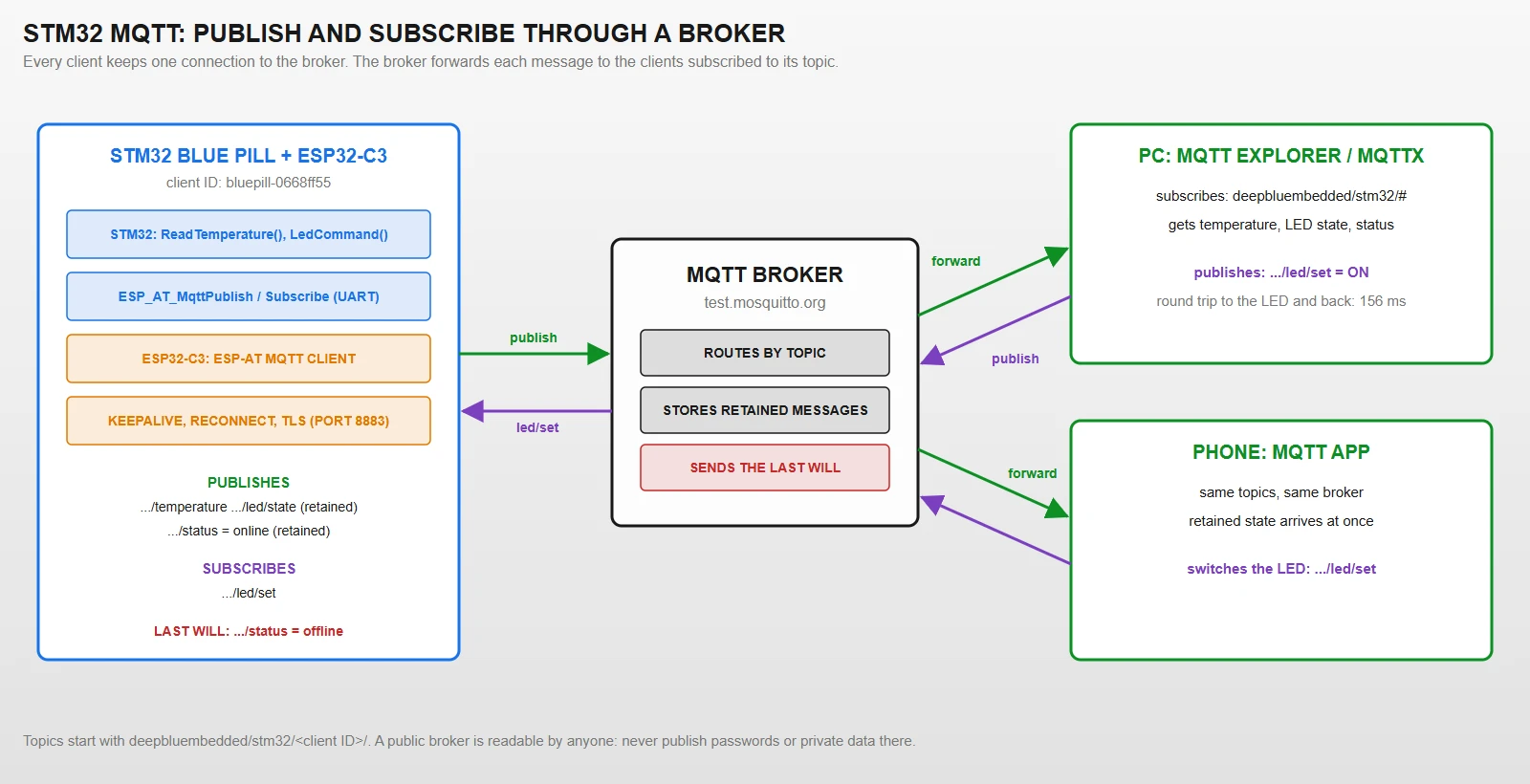
STM32 MQTT Over WiFi: How It Works
The STM32 doesn’t need an MQTT library or a TCP/IP stack. The ESP32-C3’s ESP-AT firmware has an MQTT client built in: it connects to the broker, keeps the connection alive, and even reconnects by itself. The STM32 sends it AT commands over the UART and receives the subscribed messages as +MQTTSUBRECV lines:
| Step | AT Command or Message | What It Does |
|---|---|---|
| Client settings | AT+MQTTUSERCFG=0,1,"<client id>","<user>","<password>",0,0,"" | Scheme 1 = MQTT over TCP, 2 = MQTT over TLS |
| Connection settings (optional) | AT+MQTTCONNCFG=0,<keepalive>,0,"<will topic>","<will message>",<qos>,<retain> | Keepalive, clean session, last will |
| Connect | AT+MQTTCONN=0,"test.mosquitto.org",1883,1 | The last 1 = reconnect automatically. Replies +MQTTCONNECTED:... and OK |
| Publish text | AT+MQTTPUB=0,"<topic>","<data>",<qos>,<retain> | For short text messages |
| Publish raw data | AT+MQTTPUBRAW=0,"<topic>",<length>,<qos>,<retain> | Long or binary data, sent after the > prompt; ends with +MQTTPUB:OK |
| Subscribe | AT+MQTTSUB=0,"<topic>",<qos> | Messages then arrive as +MQTTSUBRECV:0,"<topic>",<length>,<data> |
| Unsubscribe / close | AT+MQTTUNSUB=0,"<topic>", AT+MQTTCLEAN=0 | Stop a subscription / close the connection |
| Connection state | +MQTTCONNECTED, +MQTTDISCONNECTED | Sent by the module at any time, also after its own reconnect |
The full list is in Espressif’s ESP-AT MQTT AT commands reference. Commas, quotes, and backslashes inside a topic or message must be escaped with a backslash; our driver does that for you.
Note: The ESP-01 (ESP8266) with the NonOS AT 1.7.6 firmware from the ESP8266 AT commands tutorial has no MQTT commands. For this tutorial, use an ESP32-C3 (or another ESP32) with ESP-AT, as in the ESP32 AT commands tutorial.
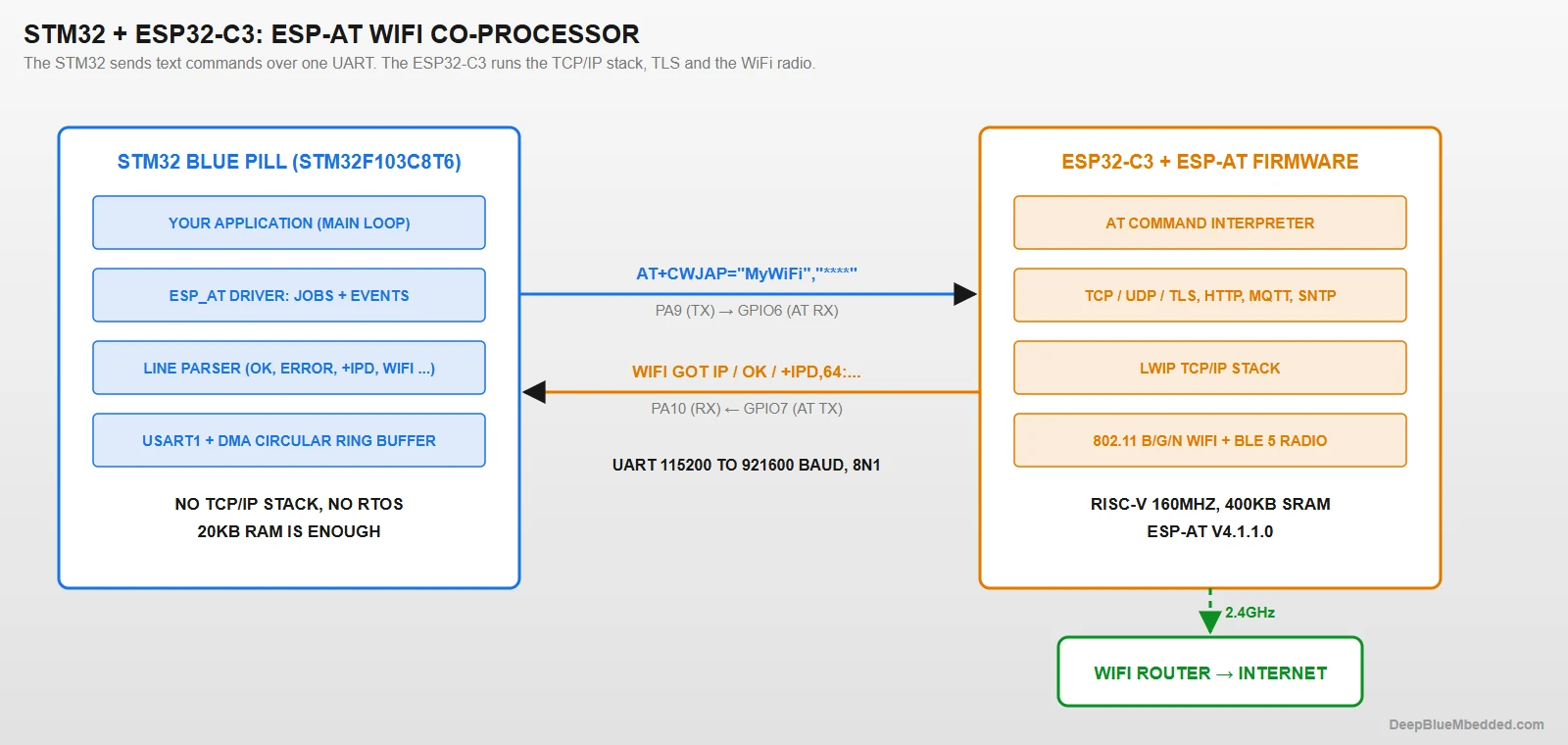
STM32 MQTT Wiring and CubeMX Configuration
Required Parts
| QTY. | Component Name | Amazon.com | AliExpress |
|---|---|---|---|
| 1 | STM32 Blue Pill (STM32F103C8T6) | Amazon | AliExpress |
| 1 | ST-Link V2 Debugger | Amazon | AliExpress |
| 1 | ESP32-C3 board (ESP32-C3 SuperMini; we use the WeAct ESP32-C3 Core Board) | Amazon | AliExpress |
| 1 | USB-TTL (UART) Converter, 3.3V | Amazon | AliExpress |
| 1 | BreadBoard | Amazon | AliExpress |
| 1 | Jumper Wires Pack | Amazon | AliExpress |
STM32 ESP32-C3 Wiring
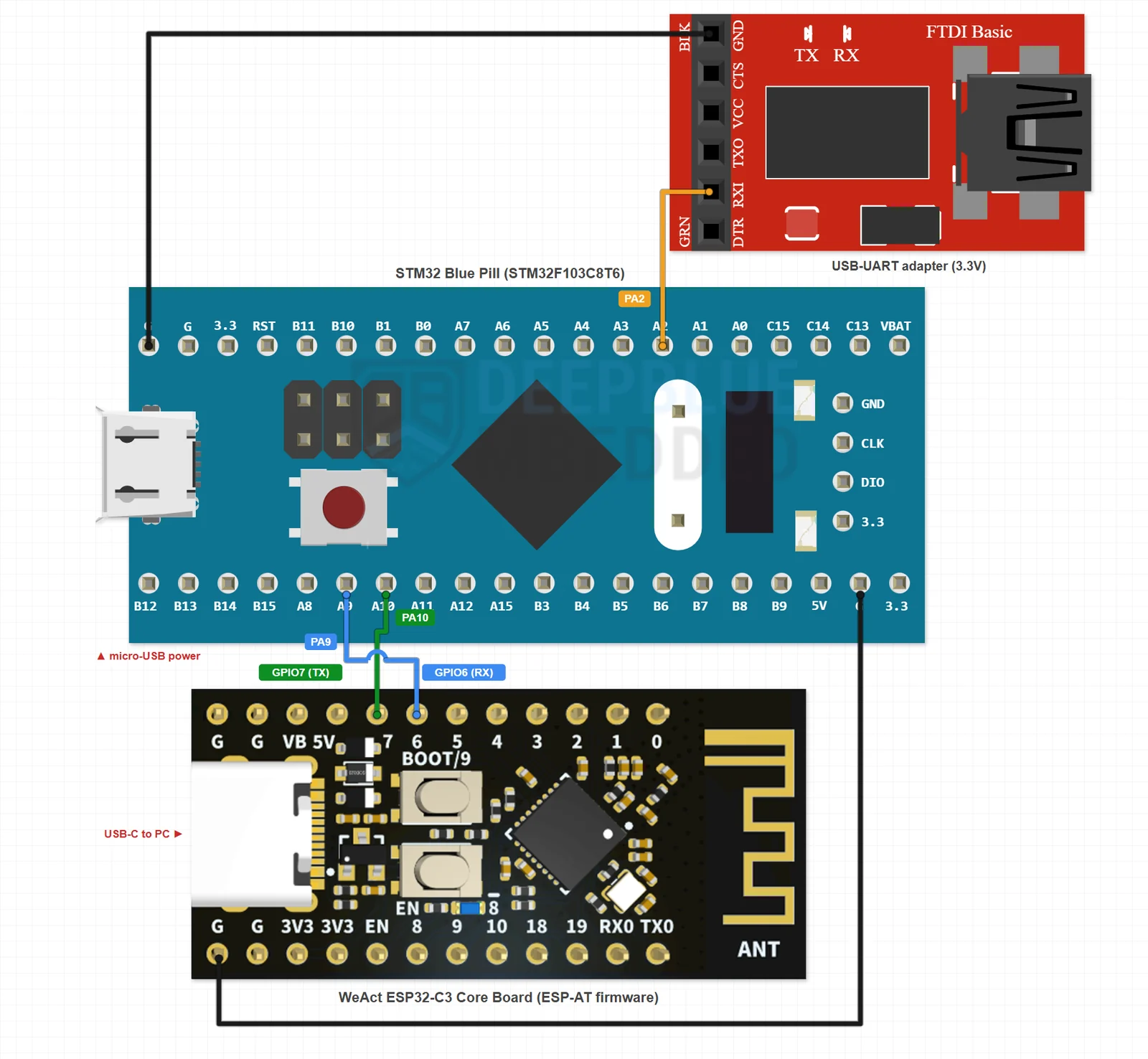
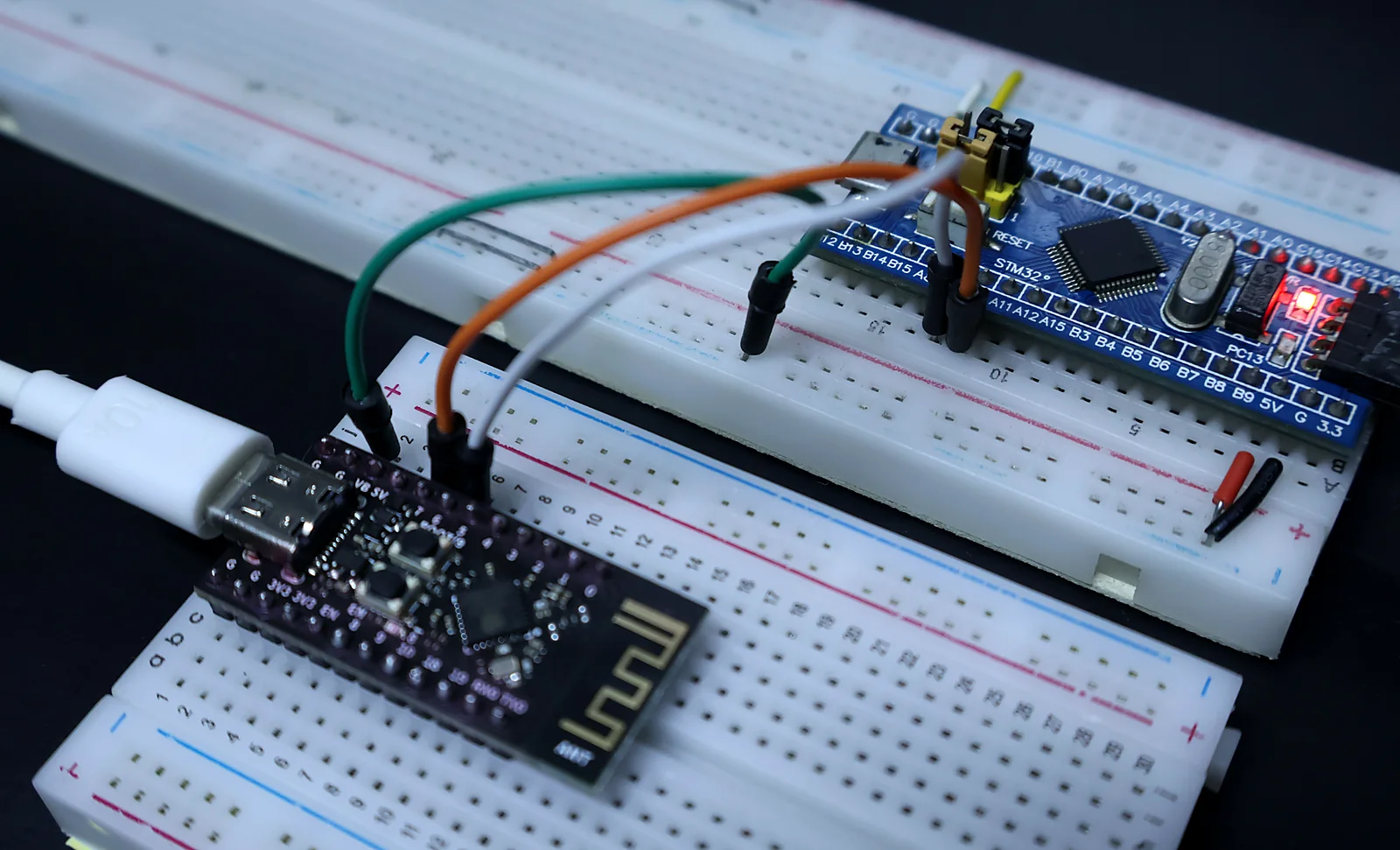
The wiring is the same as in the previous parts of this series: the STM32’s USART1 goes to the ESP32-C3’s AT port, and USART2’s TX pin goes to a USB-TTL converter for the log.
PA9 USART1 TX, goes to the ESP32-C3 GPIO6 (AT RX).
PA10 USART1 RX, goes to the ESP32-C3 GPIO7 (AT TX).
PA2 USART2 TX, goes to the USB-TTL converter’s RX: the log to your PC at 115200 baud.
GND Goes to the ESP32-C3 GND and the USB-TTL GND: common ground.
This is my test setup for this tutorial: the STM32 Blue Pill and the ESP32-C3 on a breadboard:
STM32 CubeMX Configuration
Start from the CubeMX configuration of the ESP32 AT commands tutorial (every step has a screenshot there): USART1 at 115200 baud with RX DMA in Circular mode and the USART1 global interrupt for the ESP32-C3, USART2 for the log, PC13 as the LED output, and the 72MHz clock.
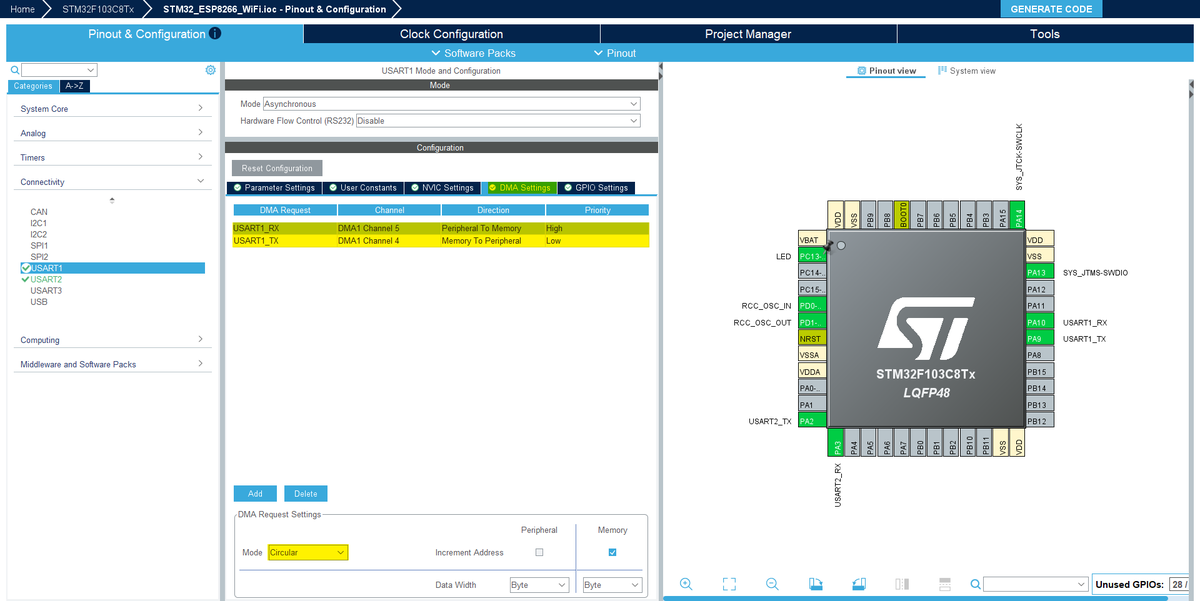
The examples publish the chip temperature, so also enable ADC1 with the Temperature Sensor Channel, set the sampling time to 239.5 cycles, and set the ADC clock to 12MHz (PCLK2 / 6), as in the STM32 web server tutorial. The STM32 internal temperature sensor tutorial explains these settings.
STM32 MQTT Functions (ESP_AT Driver)
We added an MQTT client to our ESP_AT driver for this tutorial. Every function starts a job and returns at once (the result arrives as ESP_AT_EVT_JOB_DONE), and each one has a _Blocking twin that waits for the result:
| Function or Event | What It Does |
|---|---|
ESP_AT_MqttConnect(&esp, &mqtt) | Connects to the broker set in an ESP_AT_MqttConfigType (host, port, TLS, client ID, user, password, keepalive, last will, auto reconnect) |
ESP_AT_MqttPublishString(&esp, topic, text, qos, retain) | Publishes a text message |
ESP_AT_MqttPublish(&esp, topic, data, len, qos, retain) | Publishes any data. Short text goes in one AT+MQTTPUB; long or binary data goes through AT+MQTTPUBRAW |
ESP_AT_MqttSubscribe(&esp, topic, qos) / ESP_AT_MqttUnsubscribe(&esp, topic) | Starts or stops a subscription |
ESP_AT_MqttDisconnect(&esp) | Closes the connection (AT+MQTTCLEAN=0) |
ESP_AT_EVT_MQTT_DATA | A message arrived: d->topic, d->data, d->len |
ESP_AT_EVT_MQTT_CONNECTED / _DISCONNECTED, esp.mqttConnected | The broker connection came up or was lost |
Choosing an MQTT Broker for Testing
The examples use test.mosquitto.org, a free public test broker, so they work without installing anything. Keep in mind that anyone can read and write every topic on a public broker, so never send passwords or private data there, and use a topic name nobody else uses. Our examples add the STM32’s unique chip ID to every topic ( deepbluembedded/stm32/bluepill-0668ff55/...).
| Broker | Port | Good For |
|---|---|---|
| test.mosquitto.org | 1883 (TCP), 8883 (TLS) | Quick tests, no account. Public: no private data |
| Mosquitto on your PC or a Raspberry Pi | 1883 | Your own network, private, fast |
| HiveMQ Cloud, EMQX Cloud | 8883 (TLS) | Free cloud tiers with a user name and password, reachable from anywhere |
To watch the messages on your PC, use a desktop MQTT client like MQTT Explorer or MQTTX, or the Mosquitto command line tools:
|
1 2 |
mosquitto_sub -h test.mosquitto.org -t "deepbluembedded/stm32/#" -v mosquitto_pub -h test.mosquitto.org -t "deepbluembedded/stm32/<your-id>/led/set" -m "ON" |
STM32 MQTT Example 1: Publish Sensor Data
In the first example project, the STM32 connects to test.mosquitto.org and publishes its internal temperature as a small JSON message every 5 seconds:
|
1 2 |
Topic: deepbluembedded/stm32/bluepill-0668ff55/temperature Message: {"temp":32.0,"uptime":5,"count":1} |
Wiring: PA9 to ESP32-C3 GPIO6, PA10 to GPIO7, PA2 to the USB-TTL RX, and GND to both.
Write your WiFi name and password in Core/Inc/wifi_secrets.h:
|
1 2 |
#define WIFI_SSID "YOUR_WIFI_NAME" #define WIFI_PASSWORD "YOUR_WIFI_PASSWORD" |
Here is The Application Code For This Example Project (main.c). Only the USER CODE sections are shown; the rest of the file is generated by CubeMX:
|
1 2 3 4 5 6 7 8 9 10 11 12 13 14 15 16 17 18 19 20 21 22 23 24 25 26 27 28 29 30 31 32 33 34 35 36 37 38 39 40 41 42 43 44 45 46 47 48 49 50 51 52 53 54 55 56 57 58 59 60 61 62 63 64 65 66 67 68 69 70 71 72 73 74 75 76 77 78 79 80 81 82 83 84 85 86 87 88 89 90 91 92 93 94 95 96 97 98 99 100 101 102 103 104 105 106 107 108 109 110 111 112 113 114 115 116 117 118 119 120 121 122 123 124 125 126 127 128 129 130 131 132 133 134 |
/* USER CODE BEGIN Includes */ #include <stdio.h> #include <string.h> #include <stdarg.h> #include "ESP_AT.h" #include "wifi_secrets.h" /* USER CODE END Includes */ /* USER CODE BEGIN 0 */ /* One handle per ESP module */ static ESP_AT_HandleType esp; /* printf-style log on USART2 (the USB-UART adapter to the PC) */ static void Log(const char *fmt, ...) __attribute__((format(printf, 1, 2))); static void Log(const char *fmt, ...) { char buf[200]; va_list ap; va_start(ap, fmt); int n = vsnprintf(buf, sizeof(buf), fmt, ap); va_end(ap); if (n > (int)sizeof(buf) - 1) n = (int)sizeof(buf) - 1; if (n > 0) HAL_UART_Transmit(&huart2, (uint8_t *)buf, (uint16_t)n, 100); } /* Driver traffic log: ">>" = sent to the module, "<<" = received, "--" = driver note */ static void OnTrace(ESP_AT_HandleType *h, ESP_AT_TraceType type, const char *text) __attribute__((unused)); static void OnTrace(ESP_AT_HandleType *h, ESP_AT_TraceType type, const char *text) { (void)h; Log("%s %s\r\n", (type == ESP_AT_TRACE_TX) ? ">>" : (type == ESP_AT_TRACE_RX) ? "<<" : "--", text); } /* The HAL stops the DMA reception after a UART error; the driver restarts it */ void HAL_UART_ErrorCallback(UART_HandleTypeDef *huart) { ESP_AT_UART_ErrorCallback(&esp, huart); } /* Settings for this demo */ #define MQTT_HOST "test.mosquitto.org" /* public test broker: anyone can read the topics, no secrets! */ #define MQTT_PORT 1883 /* 1883 = plain MQTT, 8883 = MQTT over TLS (set MQTT_TLS 1) */ #define MQTT_TLS 0 #define TOPIC_BASE "deepbluembedded/stm32" /* the full topic adds this board's ID: .../<id>/temperature */ #define PUBLISH_MS 5000U /* one reading every 5 s */ static char clientId[32]; /* "bluepill-" + 8 hex digits of the chip's unique ID */ static char topicTemp[80]; static char payload[96]; /* must stay unchanged until the publish job ends */ static int16_t tempTenths = 0; /* chip temperature in 0.1 C */ static uint32_t publishStart = 0, published = 0; /* STM32F103 internal temperature sensor (datasheet: V25 = 1.43 V, Avg_Slope = 4.3 mV/C), 16 readings averaged */ static void ReadTemperature(void) { uint32_t sum = 0; for (uint8_t i = 0; i < 16; i++) { HAL_ADC_Start(&hadc1); if (HAL_ADC_PollForConversion(&hadc1, 5) == HAL_OK) sum += HAL_ADC_GetValue(&hadc1); HAL_ADC_Stop(&hadc1); } int32_t mv = (int32_t)((sum / 16U) * 3300U / 4095U); tempTenths = (int16_t)(((1430 - mv) * 100) / 43 + 250); } static void OnEvent(ESP_AT_HandleType *h, ESP_AT_EventType ev, const ESP_AT_EventDataType *d) { (void)h; switch (ev) { case ESP_AT_EVT_MQTT_CONNECTED: Log("[mqtt] connected to the broker\r\n"); break; case ESP_AT_EVT_MQTT_DISCONNECTED: Log("[mqtt] connection lost (the module reconnects by itself)\r\n"); break; case ESP_AT_EVT_WIFI_DISCONNECTED: Log("[wifi] disconnected\r\n"); break; case ESP_AT_EVT_WIFI_GOT_IP: Log("[wifi] connected\r\n"); break; case ESP_AT_EVT_JOB_DONE: if (d->job == ESP_AT_JOB_MQTT_PUBLISH) Log("[mqtt] published %s -> %s (%lu ms)\r\n", payload, ESP_AT_StatusText(d->status), (unsigned long)(HAL_GetTick() - publishStart)); break; default: break; } } /* USER CODE END 0 */ /* Inside main(), after the MX_..._Init() calls */ /* USER CODE BEGIN 2 */ ESP_AT_ConfigType cfg = {0}; cfg.huart = &huart1; cfg.autoReconnect = 1; /* rejoin the WiFi after a drop */ cfg.onEvent = OnEvent; Log("\r\n=== ESP_AT Demo 10: MQTT publish ===\r\n"); HAL_ADCEx_Calibration_Start(&hadc1); snprintf(clientId, sizeof(clientId), "bluepill-%08lx", (unsigned long)HAL_GetUIDw0()); snprintf(topicTemp, sizeof(topicTemp), "%s/%s/temperature", TOPIC_BASE, clientId); if (ESP_AT_Init(&esp, &cfg) != ESP_AT_OK) Error_Handler(); if (ESP_AT_Begin_Blocking(&esp) != ESP_AT_OK) { Log("no module\r\n"); Error_Handler(); } Log("Module: %s\r\n", esp.version); if (ESP_AT_WiFiJoin_Blocking(&esp, WIFI_SSID, WIFI_PASSWORD) != ESP_AT_OK) { Log("join failed\r\n"); Error_Handler(); } Log("WiFi: %s\r\n", esp.ip); /* The broker connection. The module keeps it up and reconnects by itself (autoReconnect). */ static const ESP_AT_MqttConfigType mqtt = { .host = MQTT_HOST, .port = MQTT_PORT, .tls = MQTT_TLS, .clientId = clientId, .keepAliveS = 60, .autoReconnect = 1 }; uint32_t t0 = HAL_GetTick(); ESP_AT_StatusType s = ESP_AT_MqttConnect_Blocking(&esp, &mqtt); Log("MQTT connect to %s:%u: %s in %lu ms (AT+MQTTCONN alone: %lu ms)\r\n", MQTT_HOST, (unsigned)MQTT_PORT, ESP_AT_StatusText(s), (unsigned long)(HAL_GetTick() - t0), (unsigned long)esp.lastCmdMs); Log("Publishing to %s every %lu s\r\n", topicTemp, (unsigned long)(PUBLISH_MS / 1000U)); uint32_t publishTime = HAL_GetTick() - PUBLISH_MS; /* USER CODE END 2 */ /* Inside while (1) */ /* USER CODE BEGIN 3 */ ESP_AT_Process(&esp); /* Every PUBLISH_MS: read the sensor and publish one JSON message (QoS 0, not retained) */ if (HAL_GetTick() - publishTime >= PUBLISH_MS && esp.mqttConnected && !ESP_AT_IsBusy(&esp)) { publishTime = HAL_GetTick(); ReadTemperature(); int t = tempTenths < 0 ? -tempTenths : tempTenths; snprintf(payload, sizeof(payload), "{\"temp\":%s%d.%d,\"uptime\":%lu,\"count\":%lu}", tempTenths < 0 ? "-" : "", t / 10, t % 10, (unsigned long)(HAL_GetTick() / 1000U), (unsigned long)++published); publishStart = HAL_GetTick(); if (ESP_AT_MqttPublishString(&esp, topicTemp, payload, 0, 0) != ESP_AT_OK) Log("[mqtt] publish not started\r\n"); } } /* USER CODE END 3 */ |
STM32 MQTT Publish Example Code Explanation
The client ID and the topic are built from the STM32’s unique ID ( HAL_GetUIDw0()), so two boards running the same code never share a client ID. A broker drops the older connection when a second client connects with the same ID.
ESP_AT_MqttConfigType holds the broker settings: the host, the port, .tls = 0 for plain MQTT, a 60-second keepalive, and .autoReconnect = 1, which tells the ESP32-C3 to reconnect to the broker by itself after a WiFi or broker drop. ESP_AT_MqttConnect_Blocking() sends the AT commands and waits for +MQTTCONNECTED.
In the main loop, every PUBLISH_MS (5 seconds), the code reads the temperature sensor, formats the JSON message with snprintf(), and starts the publish with ESP_AT_MqttPublishString() (QoS 0, not retained). It only publishes while esp.mqttConnected is set, and the result arrives in OnEvent() as ESP_AT_EVT_JOB_DONE, where the code logs it with the time it took.
ReadTemperature() averages 16 conversions of the internal temperature sensor and converts them to °C with the datasheet’s V25 and Avg_Slope values, as explained in the STM32 internal temperature sensor tutorial.
STM32 MQTT Publish Example Testing
This is the STM32’s log after a reset. The “connection lost” line comes from the connection of the previous run: the ESP32-C3 still held it when the STM32 restarted, and our driver closes it before connecting again.
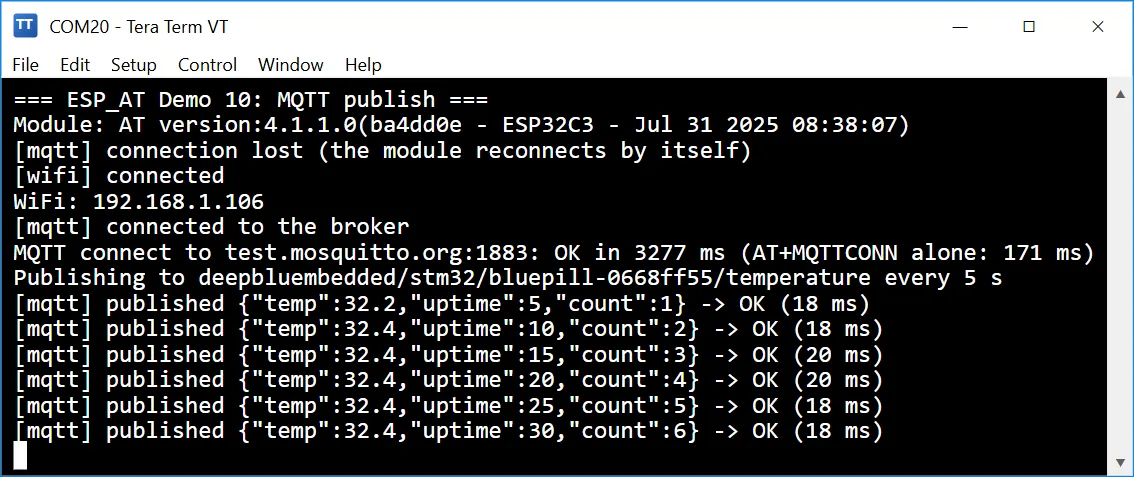
And this is a subscriber on my PC ( deepbluembedded/stm32/+/temperature), receiving a message every 5 seconds:
|
1 2 3 4 5 |
14:53:15 deepbluembedded/stm32/bluepill-0668ff55/temperature {"temp":32.2,"uptime":5,"count":1} 14:53:20 deepbluembedded/stm32/bluepill-0668ff55/temperature {"temp":32.4,"uptime":10,"count":2} (+4.98 s) 14:53:25 deepbluembedded/stm32/bluepill-0668ff55/temperature {"temp":32.4,"uptime":15,"count":3} (+5.01 s) 14:53:30 deepbluembedded/stm32/bluepill-0668ff55/temperature {"temp":32.4,"uptime":20,"count":4} (+4.99 s) 14:53:35 deepbluembedded/stm32/bluepill-0668ff55/temperature {"temp":32.4,"uptime":25,"count":5} (+5.00 s) |
STM32 MQTT Example 2: Subscribe to Control an LED
In this example project, the STM32 subscribes to a command topic and switches its LED (PC13) when a message arrives, and it reports its LED state and its online/offline status. These are the topics it uses:
| Topic (after deepbluembedded/stm32/<id>/) | Direction | Messages |
|---|---|---|
led/set | To the STM32 (subscribed, QoS 1) | ON, OFF, TOGGLE |
led/state | From the STM32 (QoS 1, retained) | ON or OFF, after every change and every (re)connect |
status | From the STM32 and the broker (QoS 1, retained) | online after connecting; offline is the last will |
temperature | From the STM32 (QoS 0) | The chip temperature every 10 seconds |
Because led/state and status are retained, an app that subscribes later gets the current LED state and whether the board is online at once, without waiting for the next change.
Here is The Application Code For This Example Project (main.c). Only the USER CODE sections are shown; the rest of the file is generated by CubeMX:
|
1 2 3 4 5 6 7 8 9 10 11 12 13 14 15 16 17 18 19 20 21 22 23 24 25 26 27 28 29 30 31 32 33 34 35 36 37 38 39 40 41 42 43 44 45 46 47 48 49 50 51 52 53 54 55 56 57 58 59 60 61 62 63 64 65 66 67 68 69 70 71 72 73 74 75 76 77 78 79 80 81 82 83 84 85 86 87 88 89 90 91 92 93 94 95 96 97 98 99 100 101 102 103 104 105 106 107 108 109 110 111 112 113 114 115 116 117 118 119 120 121 122 123 124 125 126 127 128 129 130 131 132 133 134 135 136 137 138 139 140 141 142 143 144 145 146 147 148 149 150 151 152 153 154 155 156 157 158 159 160 161 162 163 164 165 166 167 168 169 170 171 172 173 174 175 176 177 |
/* USER CODE BEGIN Includes */ #include <stdio.h> #include <string.h> #include <stdarg.h> #include "ESP_AT.h" #include "wifi_secrets.h" /* USER CODE END Includes */ /* USER CODE BEGIN 0 */ /* One handle per ESP module */ static ESP_AT_HandleType esp; /* printf-style log on USART2 (the USB-UART adapter to the PC) */ static void Log(const char *fmt, ...) __attribute__((format(printf, 1, 2))); static void Log(const char *fmt, ...) { char buf[200]; va_list ap; va_start(ap, fmt); int n = vsnprintf(buf, sizeof(buf), fmt, ap); va_end(ap); if (n > (int)sizeof(buf) - 1) n = (int)sizeof(buf) - 1; if (n > 0) HAL_UART_Transmit(&huart2, (uint8_t *)buf, (uint16_t)n, 100); } /* Driver traffic log: ">>" = sent to the module, "<<" = received, "--" = driver note */ static void OnTrace(ESP_AT_HandleType *h, ESP_AT_TraceType type, const char *text) __attribute__((unused)); static void OnTrace(ESP_AT_HandleType *h, ESP_AT_TraceType type, const char *text) { (void)h; Log("%s %s\r\n", (type == ESP_AT_TRACE_TX) ? ">>" : (type == ESP_AT_TRACE_RX) ? "<<" : "--", text); } /* The HAL stops the DMA reception after a UART error; the driver restarts it */ void HAL_UART_ErrorCallback(UART_HandleTypeDef *huart) { ESP_AT_UART_ErrorCallback(&esp, huart); } /* Settings for this demo */ #define MQTT_HOST "test.mosquitto.org" /* public test broker: anyone can read and write the topics */ #define MQTT_TLS 0 /* 1 = MQTT over TLS on port 8883 (encrypted, slower connect) */ #define MQTT_PORT (MQTT_TLS ? 8883 : 1883) #define TOPIC_BASE "deepbluembedded/stm32" /* topics: <base>/<id>/led/set, led/state, status, temperature */ #define TEMP_MS 10000U /* chip temperature every 10 s */ #define SHOW_AT_TRAFFIC 0 /* 1: log every AT command and reply on USART2 */ static char clientId[32]; static char tSet[80], tState[80], tStatus[80], tTemp[80]; static char tempMsg[48]; /* must stay unchanged until the publish job ends */ static int16_t tempTenths = 0; static volatile uint8_t setupPending = 0; /* broker (re)connected: publish "online", subscribe again */ static volatile uint8_t statePending = 0; /* LED changed: publish the new state */ static uint32_t cmdTime = 0; /* when the last LED command arrived */ static uint8_t LedIsOn(void) { return HAL_GPIO_ReadPin(LED_GPIO_Port, LED_Pin) == GPIO_PIN_RESET; } /* active low */ /* STM32F103 internal temperature sensor (datasheet: V25 = 1.43 V, Avg_Slope = 4.3 mV/C), 16 readings averaged */ static void ReadTemperature(void) { uint32_t sum = 0; for (uint8_t i = 0; i < 16; i++) { HAL_ADC_Start(&hadc1); if (HAL_ADC_PollForConversion(&hadc1, 5) == HAL_OK) sum += HAL_ADC_GetValue(&hadc1); HAL_ADC_Stop(&hadc1); } int32_t mv = (int32_t)((sum / 16U) * 3300U / 4095U); tempTenths = (int16_t)(((1430 - mv) * 100) / 43 + 250); } /* A message on <base>/<id>/led/set: "ON", "OFF" or "TOGGLE" */ static void LedCommand(const uint8_t *data, uint16_t len) { char cmd[8] = ""; if (len >= sizeof(cmd)) len = sizeof(cmd) - 1; memcpy(cmd, data, len); cmd[len] = '\0'; if (strcmp(cmd, "ON") == 0) HAL_GPIO_WritePin(LED_GPIO_Port, LED_Pin, GPIO_PIN_RESET); else if (strcmp(cmd, "OFF") == 0) HAL_GPIO_WritePin(LED_GPIO_Port, LED_Pin, GPIO_PIN_SET); else if (strcmp(cmd, "TOGGLE") == 0) HAL_GPIO_TogglePin(LED_GPIO_Port, LED_Pin); else { Log("[mqtt] unknown command \"%s\"\r\n", cmd); return; } cmdTime = HAL_GetTick(); statePending = 1; Log("[mqtt] led/set \"%s\" -> LED %s\r\n", cmd, LedIsOn() ? "ON" : "OFF"); } static void OnEvent(ESP_AT_HandleType *h, ESP_AT_EventType ev, const ESP_AT_EventDataType *d) { (void)h; switch (ev) { case ESP_AT_EVT_MQTT_CONNECTED: Log("[mqtt] connected\r\n"); setupPending = 1; break; case ESP_AT_EVT_MQTT_DISCONNECTED: Log("[mqtt] connection lost (the module reconnects by itself)\r\n"); break; case ESP_AT_EVT_WIFI_DISCONNECTED: Log("[wifi] disconnected\r\n"); break; case ESP_AT_EVT_WIFI_GOT_IP: Log("[wifi] connected\r\n"); break; case ESP_AT_EVT_MQTT_DATA: /* short messages arrive in one chunk (remaining = 0) */ if (strcmp(d->topic, tSet) == 0 && d->remaining == 0) LedCommand(d->data, d->len); break; case ESP_AT_EVT_JOB_DONE: if (d->status != ESP_AT_OK) Log("[mqtt] %s: %s\r\n", ESP_AT_JobText(d->job), ESP_AT_StatusText(d->status)); break; default: break; } } /* USER CODE END 0 */ /* Inside main(), after the MX_..._Init() calls */ /* USER CODE BEGIN 2 */ ESP_AT_ConfigType cfg = {0}; cfg.huart = &huart1; cfg.autoReconnect = 1; cfg.onEvent = OnEvent; #if SHOW_AT_TRAFFIC cfg.onTrace = OnTrace; /* print every AT command and reply */ #endif Log("\r\n=== ESP_AT Demo 11: MQTT LED control (publish and subscribe) ===\r\n"); HAL_ADCEx_Calibration_Start(&hadc1); snprintf(clientId, sizeof(clientId), "bluepill-%08lx", (unsigned long)HAL_GetUIDw0()); snprintf(tSet, sizeof(tSet), "%s/%s/led/set", TOPIC_BASE, clientId); snprintf(tState, sizeof(tState), "%s/%s/led/state", TOPIC_BASE, clientId); snprintf(tStatus, sizeof(tStatus), "%s/%s/status", TOPIC_BASE, clientId); snprintf(tTemp, sizeof(tTemp), "%s/%s/temperature", TOPIC_BASE, clientId); if (ESP_AT_Init(&esp, &cfg) != ESP_AT_OK) Error_Handler(); if (ESP_AT_Begin_Blocking(&esp) != ESP_AT_OK) { Log("no module\r\n"); Error_Handler(); } Log("Module: %s\r\n", esp.version); if (ESP_AT_WiFiJoin_Blocking(&esp, WIFI_SSID, WIFI_PASSWORD) != ESP_AT_OK) { Log("join failed\r\n"); Error_Handler(); } Log("WiFi: %s\r\n", esp.ip); /* Last will: if the board vanishes (power off, WiFi lost), the broker publishes "offline" (retained) */ static const ESP_AT_MqttConfigType mqtt = { .host = MQTT_HOST, .port = MQTT_PORT, .tls = MQTT_TLS, .clientId = clientId, .keepAliveS = 30, .willTopic = tStatus, .willMessage = "offline", .willQos = 1, .willRetain = 1, .autoReconnect = 1 }; uint32_t t0 = HAL_GetTick(); ESP_AT_StatusType s = ESP_AT_MqttConnect_Blocking(&esp, &mqtt); Log("MQTT connect to %s:%u%s: %s in %lu ms (AT+MQTTCONN alone: %lu ms)\r\n", MQTT_HOST, (unsigned)MQTT_PORT, MQTT_TLS ? " (TLS)" : "", ESP_AT_StatusText(s), (unsigned long)(HAL_GetTick() - t0), (unsigned long)esp.lastCmdMs); Log("Send ON, OFF or TOGGLE to %s\r\n", tSet); uint32_t tempTime = HAL_GetTick(); /* USER CODE END 2 */ /* Inside while (1) */ /* USER CODE BEGIN 3 */ ESP_AT_Process(&esp); if (esp.mqttConnected && !ESP_AT_IsBusy(&esp)) { if (setupPending == 1) /* 1: online (retained), 2: subscribe, 3: state */ { if (ESP_AT_MqttPublishString(&esp, tStatus, "online", 1, 1) == ESP_AT_OK) setupPending = 2; } else if (setupPending == 2) { if (ESP_AT_MqttSubscribe(&esp, tSet, 1) == ESP_AT_OK) { setupPending = 0; statePending = 1; } } else if (statePending) /* retained: a new subscriber gets the state at once */ { if (ESP_AT_MqttPublishString(&esp, tState, LedIsOn() ? "ON" : "OFF", 1, 1) == ESP_AT_OK) { statePending = 0; if (cmdTime) { Log("[mqtt] led/state published %lu ms after the command\r\n", (unsigned long)(HAL_GetTick() - cmdTime)); cmdTime = 0; } } } else if (HAL_GetTick() - tempTime >= TEMP_MS) { tempTime = HAL_GetTick(); ReadTemperature(); int t = tempTenths < 0 ? -tempTenths : tempTenths; snprintf(tempMsg, sizeof(tempMsg), "%s%d.%d", tempTenths < 0 ? "-" : "", t / 10, t % 10); ESP_AT_MqttPublishString(&esp, tTemp, tempMsg, 0, 0); } } } /* USER CODE END 3 */ |
STM32 MQTT Subscribe Example Code Explanation
The last will is set in the connection settings: .willTopic = tStatus, .willMessage = "offline", .willQos = 1, .willRetain = 1. The broker stores it at connect time and publishes it if the board disappears. The keepalive is 30 seconds, so the broker notices a silent board within 45 seconds.
When the broker connection comes up (also after the ESP32-C3 reconnects by itself), OnEvent() gets ESP_AT_EVT_MQTT_CONNECTED and sets setupPending. The main loop then runs three steps, one job at a time: publish online (retained), subscribe to led/set, and publish the LED state. Subscribing again after every reconnect makes sure the subscription is never lost.
A message on a subscribed topic arrives as ESP_AT_EVT_MQTT_DATA. The code compares the topic with tSet and passes the message to LedCommand(), which switches the LED and sets statePending. The main loop then publishes the new state. Nothing is published from inside the event callback, because the driver runs one job at a time.
Tip: Set SHOW_AT_TRAFFIC to 1 to log every AT command and reply on USART2. It’s the quickest way to see what the module does when something doesn’t work.
STM32 MQTT Subscribe Example Testing
This is the real hardware testing result for this example project. On the left is a small MQTT client page in my browser ( mqtt-led-client.html in the download folder; it talks to test.mosquitto.org over WebSocket), and on the right is my webcam on the Blue Pill. Every click publishes ON or OFF to led/set, the PC13 LED switches a moment later, and the page shows the led/state message the STM32 sends back.
I sent ON and OFF to led/set from my PC, waiting each time for led/state to come back through the broker. The STM32 starts publishing the new state 3 ms after the command arrives:
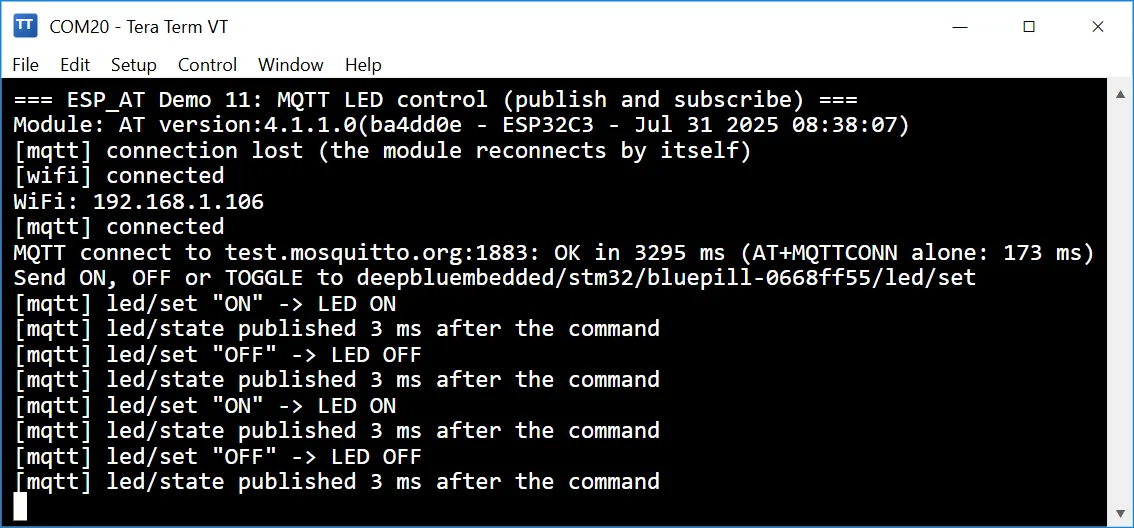
The PC side measured the full round trip (PC to the broker, to the ESP32-C3 and the STM32, the LED switch, and the state back through the broker to the PC). The median was 156ms, and the broker’s ping time from my PC was 62ms:
|
1 2 3 4 5 6 7 8 9 10 11 |
round 1: ON -> led/state ON after 165 ms round 2: OFF -> led/state OFF after 155 ms round 3: ON -> led/state ON after 163 ms round 4: OFF -> led/state OFF after 154 ms round 5: ON -> led/state ON after 155 ms round 6: OFF -> led/state OFF after 160 ms round 7: ON -> led/state ON after 155 ms round 8: OFF -> led/state OFF after 156 ms round 9: ON -> led/state ON after 156 ms round 10: OFF -> led/state OFF after 156 ms median 156 ms, min 154, max 165, 10/10 answered |
To test the last will, I made the ESP32-C3 drop its WiFi connection (a new join, as after a reset). About 5 seconds later, the broker published offline on the status topic, and a moment after the board reconnected, online replaced it.
STM32 MQTT Example 3: MQTT Over TLS (Port 8883)
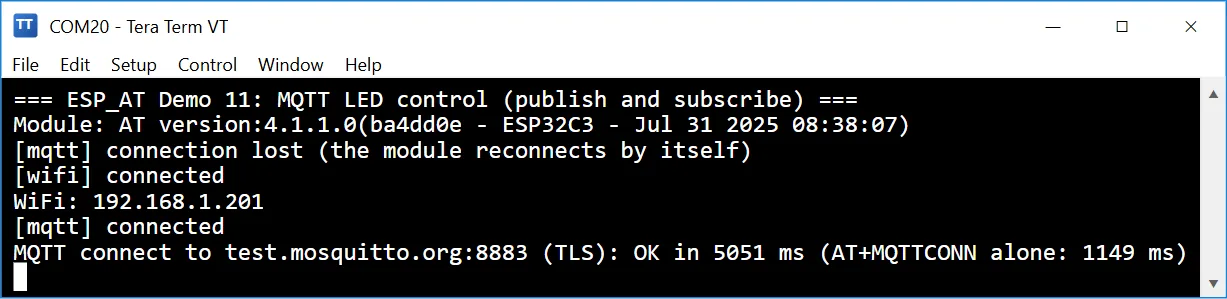
MQTT on port 1883 is plain text: anyone on the path can read the messages and the password. With TLS, the ESP32-C3 encrypts the connection, and the STM32 code stays the same. In Example 2, set:
|
1 |
#define MQTT_TLS 1 /* 1 = MQTT over TLS on port 8883 */ |
This sets .tls = 1 (scheme 2 in AT+MQTTUSERCFG) and port 8883. All the TLS work runs on the ESP32-C3, so the STM32 needs no extra RAM or flash. This is the result:
|
1 2 3 4 5 6 7 8 9 10 11 |
round 1: ON -> led/state ON after 166 ms round 2: OFF -> led/state OFF after 162 ms round 3: ON -> led/state ON after 160 ms round 4: OFF -> led/state OFF after 159 ms round 5: ON -> led/state ON after 161 ms round 6: OFF -> led/state OFF after 215 ms round 7: ON -> led/state ON after 157 ms round 8: OFF -> led/state OFF after 166 ms round 9: ON -> led/state ON after 161 ms round 10: OFF -> led/state OFF after 163 ms median 162 ms, min 157, max 215, 10/10 answered |
The TLS handshake made AT+MQTTCONN take about 1.05 seconds instead of 0.18 seconds, but once connected, the round trip was almost the same (162ms vs 156ms). The connection is encrypted, but scheme 2 does not check the broker’s certificate. To check it, ESP-AT needs the broker’s CA certificate flashed into its certificate partition (scheme 4), which is beyond this tutorial.
STM32 MQTT Measured: Connect, Publish and Round Trip Times
All measured with test.mosquitto.org (62ms ping from my PC) and the UART at 115200 baud:
| Measurement | MQTT (port 1883) | MQTT over TLS (port 8883) |
|---|---|---|
AT+MQTTCONN (connect to the broker) | 173 to 237ms | 1030 to 1149ms |
| Full connect after an STM32 reset (close the old connection, rejoin, connect) | 3.3 to 4.1s | 4.9 to 5.1s |
Publish a 40-byte message (AT+MQTTPUB until OK) | 18ms | – |
| Command to LED state round trip through the broker (median of 10) | 156ms | 162ms |
| From the command arriving to the state publish starting | 2 to 3ms | 2 to 3ms |
The slowest part is the reconnect after an STM32 reset: the ESP32-C3 keeps its old broker connection while the STM32 restarts, and closing it with AT+MQTTCLEAN takes a few seconds. Our driver waits up to 10 seconds for it. If your STM32 resets often, you can skip the WiFi join and the reconnect when AT+MQTTCONN? shows the module is still connected.
STM32 MQTT Troubleshooting
AT+MQTTUSERCFG or AT+MQTTCONN returns ERROR
Check that the firmware has MQTT (ESP-AT on an ESP32; NonOS AT 1.7.6 on the ESP-01 has none) and that the WiFi is connected. An ERROR right after an STM32 reset usually means the module was still closing the old connection (“busy p…”); give AT+MQTTCLEAN a few seconds, as our driver does.
Connected, but no messages arrive
The subscribe topic must match the publish topic exactly (topics are case-sensitive), and both clients must use the same broker. Subscribe to deepbluembedded/stm32/# in MQTT Explorer to see every message under the prefix.
The connection drops every few minutes
Two clients with the same client ID kick each other off the broker. Make the client ID unique (our examples add the chip’s unique ID). Also check the keepalive: the ESP32-C3 sends the pings by itself, so the STM32 code doesn’t need to.
Messages with commas or quotes are cut
Inside AT+MQTTPUB, commas, quotes, and backslashes must be escaped with a backslash. ESP_AT_MqttPublish() escapes them, and it switches to AT+MQTTPUBRAW for binary or long messages.
STM32 MQTT FAQ
Does the STM32 need an MQTT library like Paho or the LwIP MQTT client?
Not with an ESP32-C3 running ESP-AT. The MQTT client, TCP/IP, and TLS run on the ESP32-C3, and the STM32 only sends AT commands. You need an MQTT library (Paho Embedded, LwIP MQTT, or Mongoose) for an STM32 with Ethernet, a W5500, or a cellular modem without MQTT commands.
Can the STM32 be the MQTT broker?
No. A broker runs on a PC, a Raspberry Pi, a server, or a cloud service. The STM32 is a client that connects to it.
Which QoS should I use?
QoS 0 for frequent readings (losing one doesn’t matter), QoS 1 for commands and states (the broker acknowledges them). QoS 2 is rarely needed on a microcontroller.
How much RAM and flash does the MQTT code use on the STM32?
The whole Example 2 project (driver, MQTT, ADC, and HAL) builds to about 25KB of flash and 6.6KB of RAM in a Release build, and the driver’s handle is about 4KB of that RAM. TLS adds nothing on the STM32 side.
STM32 WiFi Tutorial Series
This tutorial is the sixth part of our STM32 WiFi tutorial series:
| Part | Tutorial | What You’ll Build |
|---|---|---|
| 1 | STM32 WiFi | Choosing a WiFi module, quick start, ESP32-C3 vs ESP8266 measured |
| 2 | ESP8266 AT Commands With STM32 | ESP8266 AT firmware, commands, and our ESP_AT driver |
| 3 | ESP32 AT Commands With STM32 | ESP-AT firmware, commands, SNTP time, and our ESP_AT driver |
| 4 | STM32 HTTP Client Over WiFi | GET, POST, HTTPS, and JSON parsing |
| 5 | STM32 Web Server Over WiFi | Control GPIO from a browser, live temperature dashboard |
| 6 | STM32 MQTT Tutorial (this tutorial) | Publish and subscribe, last will, MQTT over TLS |
| 7 | STM32 OTA Firmware Update Over WiFi | Bootloader, dual-slot update, CRC32 check |
| 8 | STM32 WebSocket With ESP32 | WebSocket server on the STM32, live dashboard |
Download STM32 MQTT Example Projects (Publish, Subscribe, TLS)
Download all attachment files for this Article/Tutorial (project files, schematics, code, etc.) using the link below. Everything is tested and verified to work on real hardware, as you’ve seen in the demo videos & screenshots. Please consider supporting my work if it helped you.
Wrap Up
To conclude this tutorial, we’ve connected an STM32 to an MQTT broker over WiFi with an ESP32-C3 and our ESP_AT driver. The ESP32-C3’s built-in MQTT client handles the broker connection, the keepalive, TLS, and reconnects, while the STM32 publishes its readings and reacts to commands with a few function calls. We published the chip temperature, controlled the LED with a retained state and a last will, switched to TLS, and measured a 156ms round trip from a PC to the LED and back.
In the next part of this series, we’ll update the STM32’s firmware over WiFi (OTA).
