In this tutorial, we’ll discuss how the STM32 I2C Slave mode works. You’ll learn how to configure an STM32 microcontroller as an I2C slave device and how to send or receive data when it is addressed by an I2C master on the bus.
We’ll implement three example projects for STM32 I2C Slave Receiver, Transmitter, and Transceiver modes to practice what we’ll learn in this tutorial. In all examples, we’ll create one-way or two-way communication between two STM32 boards over the I2C bus. Without further ado, let’s get right into it!
STM32 I2C Slave Mode
In I2C slave mode, an STM32 microcontroller waits on the I2C bus until an I2C master addresses it. Unlike the I2C master, the slave device doesn’t initiate START, RESTART, STOP conditions, or generate the clock signal. The master controls the bus timing, selects the slave address, and decides whether the transaction is a write operation to the slave or a read operation from the slave.
As stated in the first STM32 I2C Tutorial, the I2C bus supports multiple masters and multiple slaves at the same time. It also includes a built-in arbitration mechanism for multi-master operation, and a clock stretching feature that allows an I2C slave device to slow down the communication when needed.
For an STM32 I2C slave application, the most important part is the address-match event. Once the master sends this STM32 slave address on the bus, the STM32 HAL driver calls an address callback. Inside that callback, we can decide what to do next:
- Receive data if the master is writing to this slave.
- Transmit data if the master is reading from this slave.
- Handle both directions if the slave is used as a bidirectional device.
The STM32 HAL I2C drivers provide different transaction modes that can be used in slave applications. These modes can be divided as follows:
- Single IO operations
- Sequential IO operations
Single IO operations are used to send/receive a single-shot I2C transaction (complete I2C frame) over the I2C bus between a master and a slave device at a specific I2C address. The I2C bus is released immediately after the end of the single-frame I2C transaction, which is suitable for simple master-slave commanding or status-checking kinds of applications.
Sequential IO operations are used to send/receive a series of I2C frames over the I2C bus between a master and a slave device at a specific I2C address. This is achieved by automatically handling the: START, STOP, and repeated START (RESTART) conditions on the I2C bus. Typically used for reading/writing chunks of data streams without releasing the I2C bus.
Note: STM32 HAL memory access functions, such as HAL_I2C_Mem_Read() and HAL_I2C_Mem_Write(), are master-side APIs. If you want your STM32 slave to behave like a register-based I2C device, you can implement that protocol yourself by receiving a register address byte from the master and then reading/writing your own software buffer.
STM32 I2C Slave HAL APIs
Here are the STM32 I2C Slave HAL functions that you can use for different I2C transactions. Slave transfers can be performed in blocking mode, interrupt mode, or DMA mode depending on your application’s needs.
I2C Slave Single IO Operations HAL Functions
|
1 2 3 4 5 6 7 8 9 10 11 |
// Blocking Transfers: HAL_I2C_Slave_Transmit(I2C_HandleTypeDef *hi2c, uint8_t *pData, uint16_t Size, uint32_t Timeout); HAL_I2C_Slave_Receive(I2C_HandleTypeDef *hi2c, uint8_t *pData, uint16_t Size, uint32_t Timeout); // Non-Blocking Transfers: Interrupt-Based HAL_I2C_Slave_Transmit_IT(I2C_HandleTypeDef *hi2c, uint8_t *pData, uint16_t Size); HAL_I2C_Slave_Receive_IT(I2C_HandleTypeDef *hi2c, uint8_t *pData, uint16_t Size); // Non-Blocking Transfers: DMA-Based HAL_I2C_Slave_Transmit_DMA(I2C_HandleTypeDef *hi2c, uint8_t *pData, uint16_t Size); HAL_I2C_Slave_Receive_DMA(I2C_HandleTypeDef *hi2c, uint8_t *pData, uint16_t Size); |
I2C Slave Sequential IO Operations HAL Functions
|
1 2 3 4 5 6 7 |
// Non-Blocking Transfers: Interrupt-Based HAL_I2C_Slave_Seq_Transmit_IT(I2C_HandleTypeDef *hi2c, uint8_t *pData, uint16_t Size, uint32_t XferOptions); HAL_I2C_Slave_Seq_Receive_IT(I2C_HandleTypeDef *hi2c, uint8_t *pData, uint16_t Size, uint32_t XferOptions); // Non-Blocking Transfers: DMA-Based HAL_I2C_Slave_Seq_Transmit_DMA(I2C_HandleTypeDef *hi2c, uint8_t *pData, uint16_t Size, uint32_t XferOptions); HAL_I2C_Slave_Seq_Receive_DMA(I2C_HandleTypeDef *hi2c, uint8_t *pData, uint16_t Size, uint32_t XferOptions); |
I2C Slave Listen Mode HAL Functions
|
1 2 |
HAL_I2C_EnableListen_IT(I2C_HandleTypeDef *hi2c); HAL_I2C_DisableListen_IT(I2C_HandleTypeDef *hi2c); |
I2C Transfer Complete Callbacks HAL APIs
|
1 2 3 4 5 6 7 8 9 10 |
HAL_I2C_MasterTxCpltCallback(); HAL_I2C_MasterRxCpltCallback(); HAL_I2C_SlaveTxCpltCallback(); HAL_I2C_SlaveRxCpltCallback(); HAL_I2C_MemTxCpltCallback(); HAL_I2C_MemRxCpltCallback(); HAL_I2C_AddrCallback(); HAL_I2C_ListenCpltCallback(); HAL_I2C_ErrorCallback(); HAL_I2C_AbortCpltCallback(); |
For STM32 I2C slave applications, the most commonly used callbacks are:
- HAL_I2C_AddrCallback() to detect that the master has addressed this slave.
- HAL_I2C_SlaveRxCpltCallback() to handle data received from the master.
- HAL_I2C_SlaveTxCpltCallback() to handle the end of a slave transmit operation.
- HAL_I2C_ListenCpltCallback() to re-enable listen mode after a completed transfer.
- HAL_I2C_ErrorCallback() to recover from bus errors, NACKs, or unexpected transfer conditions.
How To Send/Receive Data With STM32 I2C Slave
To use an STM32 microcontroller as an I2C slave, you typically configure the peripheral with a slave address, enable I2C interrupts, then call HAL_I2C_EnableListen_IT() after initialization. The I2C peripheral will keep listening until a master device addresses it.
The STM32 I2C slave can be used in three common configurations:
- I2C Master Tx -> I2C Slave Rx
- I2C Master Rx <- I2C Slave Tx
- I2C Master TxRx <-> I2C Slave RxTx
In this tutorial, we’ll focus on the Sequential I2C IO operations and build some example projects using that mode. Other modes, such as DMA-based operation or register-map emulation, can be demonstrated separately within this STM32 I2C tutorial series.
We’ll address all 3 configurations of an STM32 I2C Slave device as listed above and create a project for each case where the I2C slave device is a: (Transmitter, Receiver, and Transceiver).
STM32 I2C Slave Receive (Rx) Example
In the following example project, we’ll design a one-way communication system between two STM32 microcontrollers using the following configuration:
- STM32 I2C Master (Tx) -> STM32 I2C Slave (Rx)
In this system, each STM32 microcontroller will perform the following functions:
- I2C Master device: will read the 4x DIP switches states, and send them over I2C to the slave device (at the address = 0x33). This keeps repeating every 50ms.
- I2C Slave device: will receive (read) the incoming data from the I2C master and use it to control 4x LEDs correspondingly.
In other words, the I2C master device will control the status of the LEDs at the slave device (address= 0x33) using its DIP switches. Since only 1 byte of data is enough to hold the desired 4-bit information that we need, the sequential data transfer will only need to run once for a single data frame.
You can extend the provided code examples to better suit your application’s needs.
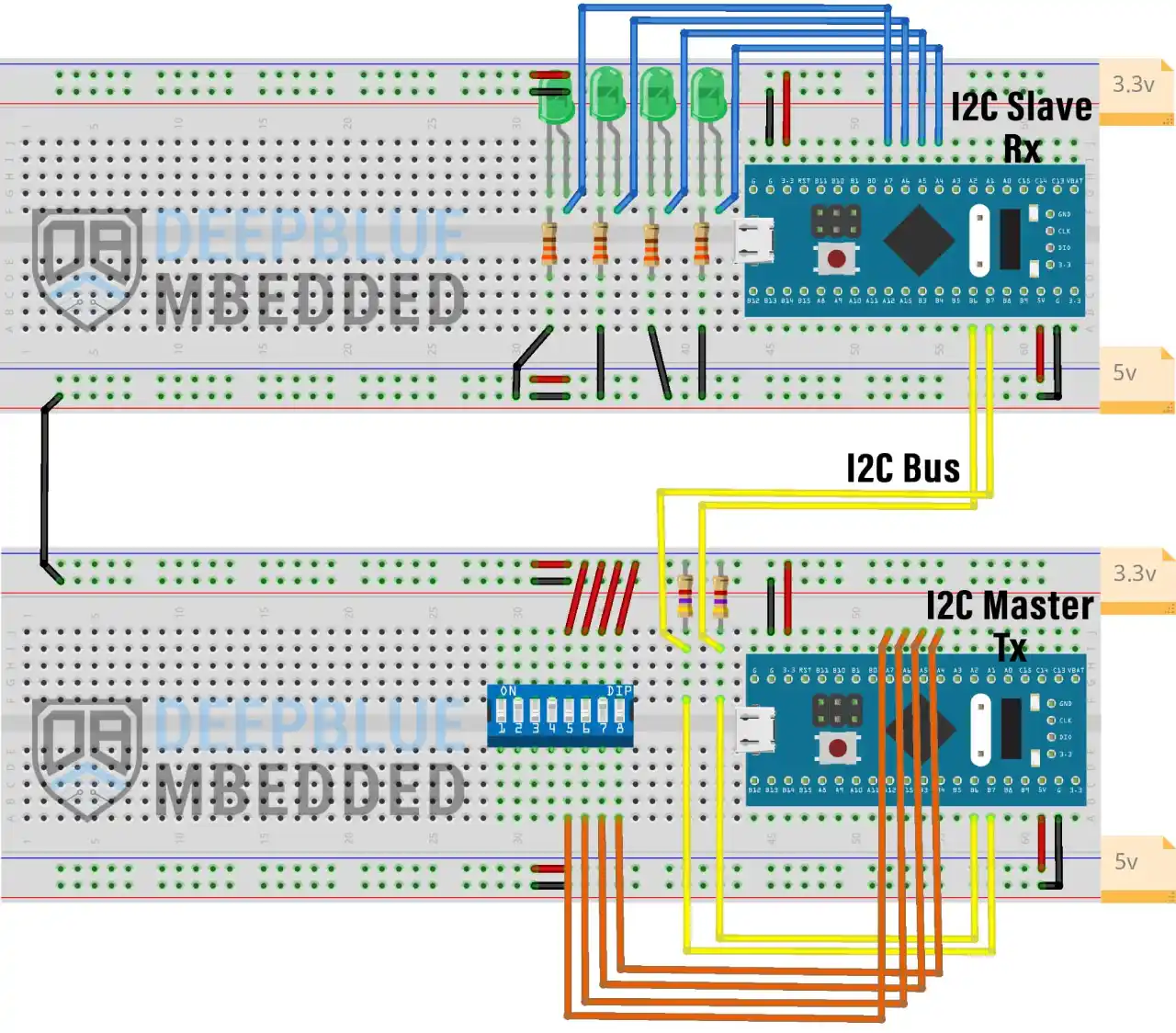
STM32 I2C Slave (Rx) <- I2C Master (Tx) Wiring
Here is the connection diagram for this example project.
STM32 I2C Master Tx Project Implementation
Step #1
Open STM32CubeMX, create a new project, and select the target microcontroller.
Step #2
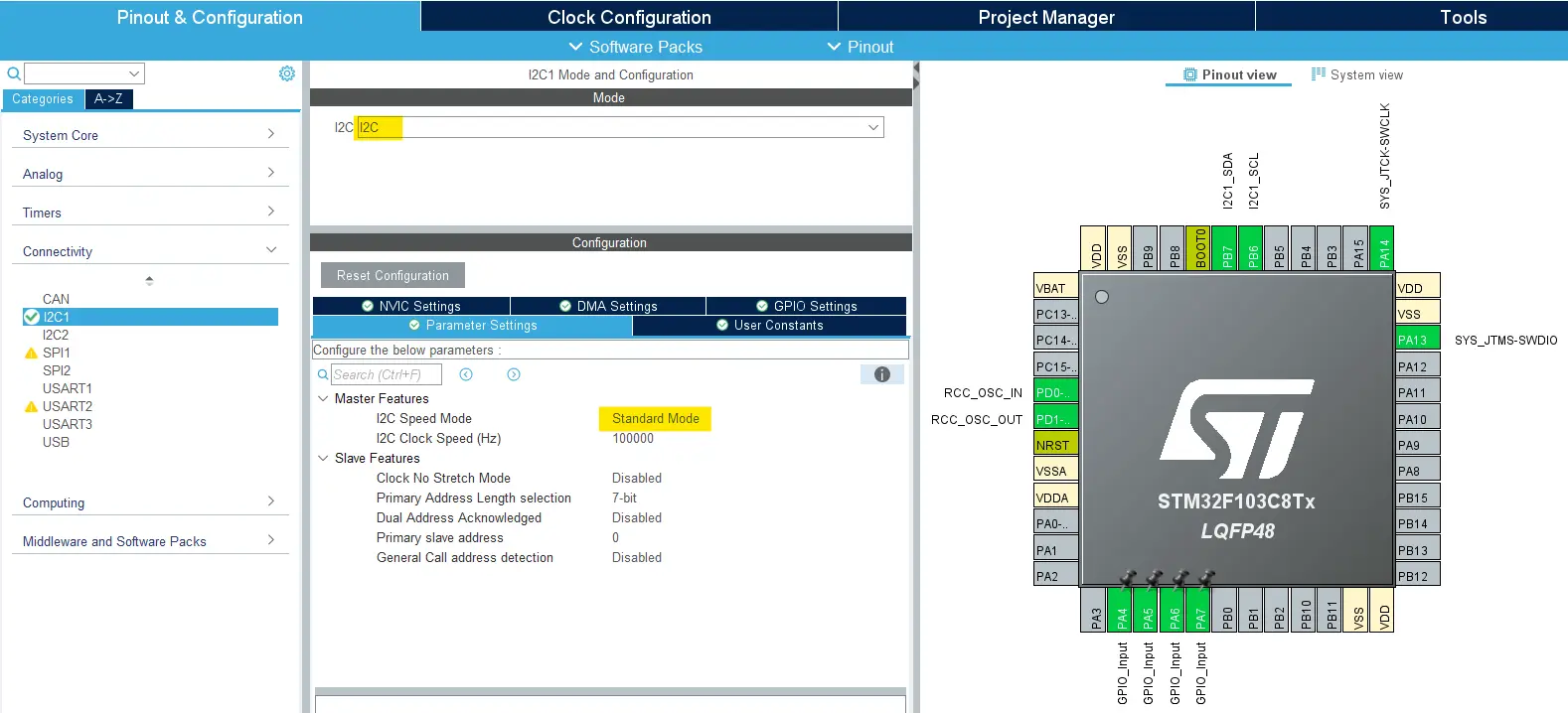
Enable I2C1 in Standard mode and leave the default configurations as is.
Then, Enable The I2C1 Event Interrupt From The NVIC Settings Tab.
Step #3
Enable 4x GPIO pins as inputs to be connected to the 4x DIP switches. For me, I’ll use the following pins: (PA4-7).
Enable the internal Pull-Down resistors for the 4x GPIO input pins.
Step #4
(optional) if debugging feature is required, DO NOT forget to enable it from the system/debug settings by selecting “Serial Wire” to have the debugger interface enabled. Otherwise, you’ll have a really bad time and frustration trying to get into debugging mode, even if you’re connecting the debugger to the SWCLK & SWDIO pins.
Step #5
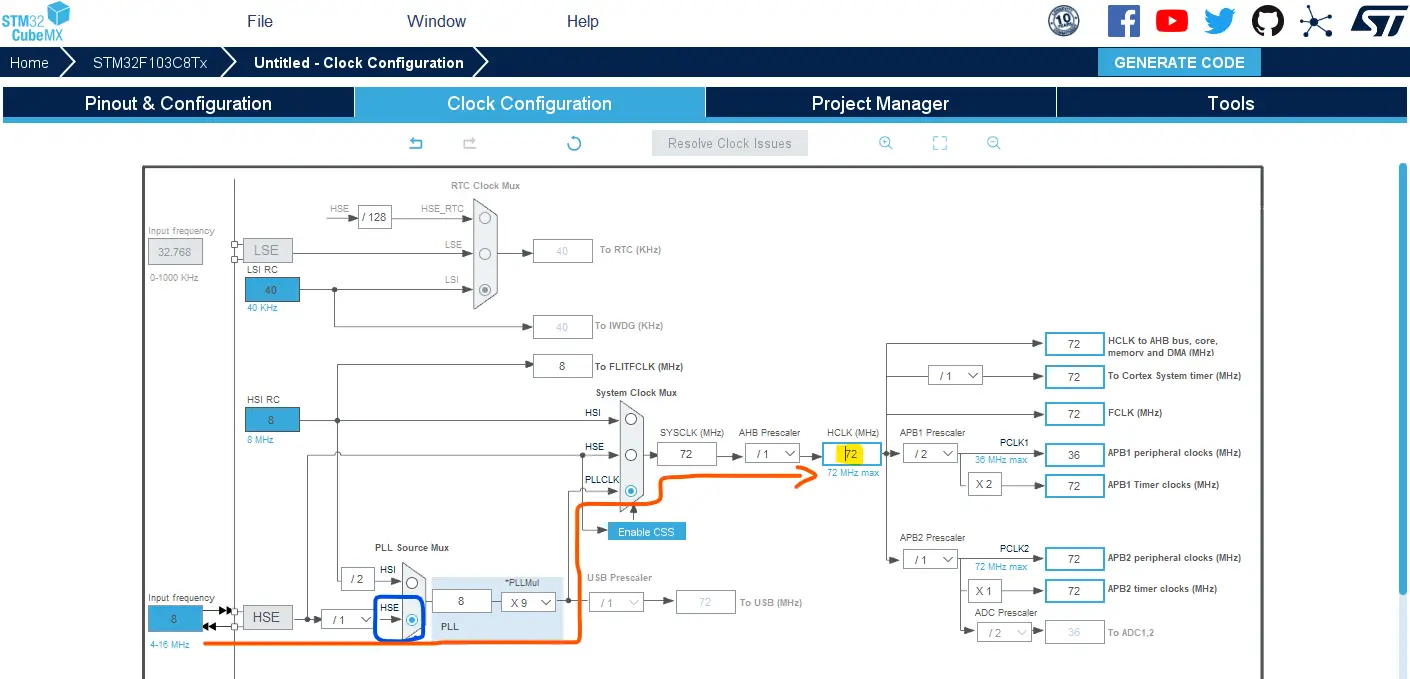
Note: Different clock configurations can be used depending on your actual hardware target. Below are the configurations for the generic Blue Pill board (STM32F103C8T6).
Go to the RCC clock configuration page and enable the HSE external crystal oscillator input.
Go to the clock configurations page, select the HSE as a clock source, PLL output, and type in 72MHz for the desired output system frequency. Hit the “ Enter” key, and let the application solve for the required PLL dividers/multipliers to achieve the desired clock rate.
Step #6
Name & Generate The Project Initialization Code For STM32CubeIDE.
Add example application code below into your project (each section between the appropriately placed denoted by HAL comments). To prevent manual code losses when updating configurations within STM32CubeMX, please make sure you’re placing each section of the application code into its right section. For more information, you can check this STM32CubeIDE Code Placement Guidelines tutorial.
STM32 I2C Master Tx Example Code
Here is The Application Code For This Example Project (main.c)
|
1 2 3 4 5 6 7 8 9 10 11 12 13 14 15 16 17 18 19 20 21 22 23 24 25 26 27 28 29 30 31 32 33 34 35 36 37 38 39 40 41 42 43 44 45 |
/* * LAB Name: STM32 I2C (Master Tx) Example * Author: Khaled Magdy * For More Info Visit: www.DeepBlueMbedded.com */ #include "main.h" #define I2C_SLAVE_ADDRESS 0x33 I2C_HandleTypeDef hi2c1; uint8_t TxData = 0x00; void SystemClock_Config(void); static void MX_GPIO_Init(void); static void MX_I2C1_Init(void); int main(void) { HAL_Init(); SystemClock_Config(); MX_GPIO_Init(); MX_I2C1_Init(); while (1) { TxData = 0x00; TxData |= (HAL_GPIO_ReadPin(GPIOA, GPIO_PIN_4) << 0); TxData |= (HAL_GPIO_ReadPin(GPIOA, GPIO_PIN_5) << 1); TxData |= (HAL_GPIO_ReadPin(GPIOA, GPIO_PIN_6) << 2); TxData |= (HAL_GPIO_ReadPin(GPIOA, GPIO_PIN_7) << 3); if( HAL_I2C_IsDeviceReady(&hi2c1, (I2C_SLAVE_ADDRESS<<1), HAL_MAX_DELAY, HAL_MAX_DELAY) == HAL_OK ) { HAL_I2C_Master_Seq_Transmit_IT(&hi2c1, (I2C_SLAVE_ADDRESS<<1), &TxData, 1, I2C_FIRST_AND_LAST_FRAME); } HAL_Delay(50); } } void HAL_I2C_MasterTxCpltCallback(I2C_HandleTypeDef *hi2c) { if(hi2c->Instance == I2C1) { // Nothing To Do Here For This Example! } } |
STM32 I2C Master Tx Code Explanation
In the main() function, we just read the status of the 4 DIP switches and construct the TxData byte to hold the status of the switches. Which we’ll send to the I2C slave device next.
Then, we call the HAL_I2C_Master_Seq_Transmit_IT() to start the transmission of the data byte over I2C to the I2C slave device at the defined address (0x33) in interrupt mode. A 50ms delay is inserted between each transaction just for timing purposes; a timer interrupt could be used instead for real-world applications.
Nothing needs to be done in the transmission completion callback function, but it’s there in case you need to use it in your actual project.
STM32 I2C Slave Rx Project Implementation
Step #1
Open STM32CubeMX, create a new project, and select the target microcontroller.
Step #2
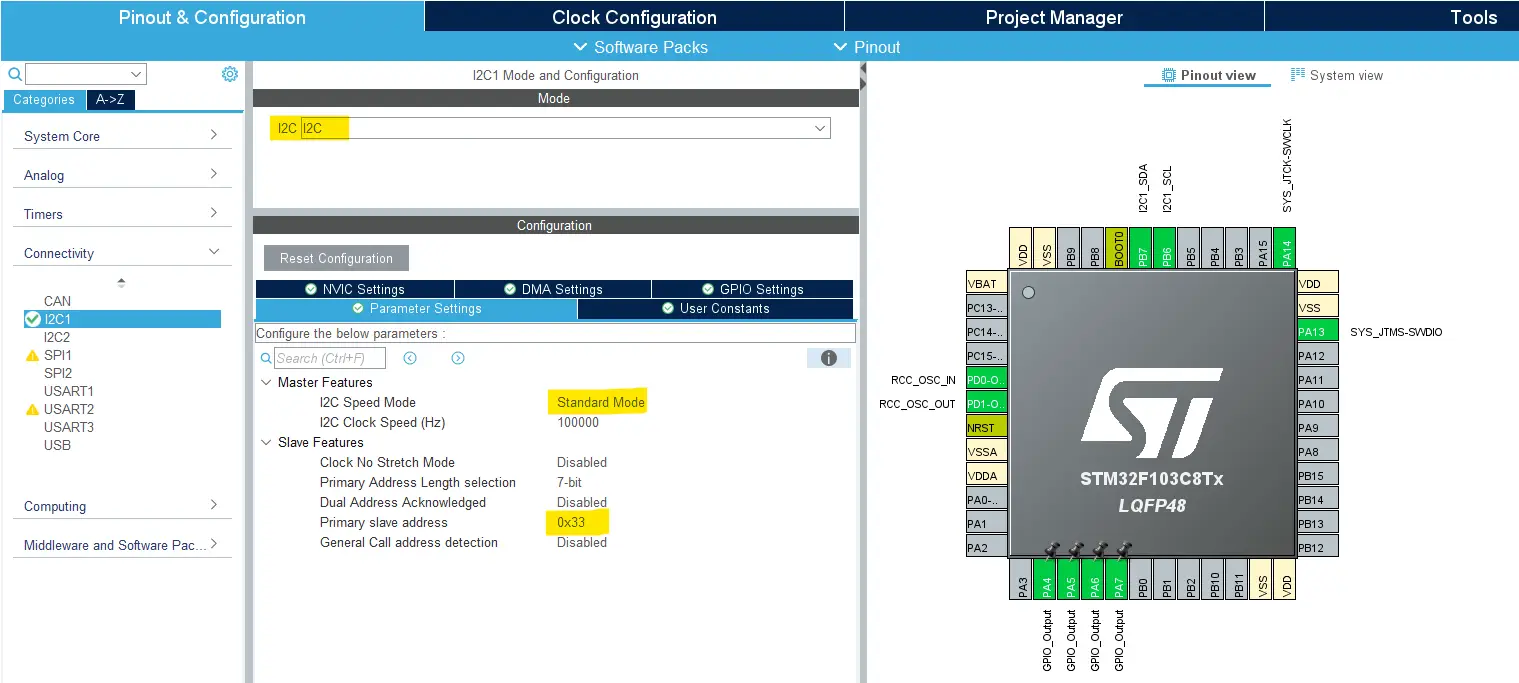
Enable I2C1 in Standard mode and leave the default configurations as is.
Add an I2C Slave Device Address of your choice for this STM32 I2C Slave microcontroller. I’ll use this value: (0x33).
Then, Enable The I2C1 Event Interrupt From The NVIC Settings Tab.
Step #3
Enable 4x GPIO pins as outputs to be connected to the 4x LEDs. For me, I’ll use the following pins: (PA4-7).
Step #4
(optional) if debugging feature is required, DO NOT forget to enable it from the system/debug settings by selecting “Serial Wire” to have the debugger interface enabled. Otherwise, you’ll have a really bad time and frustration trying to get into debugging mode, even if you’re connecting the debugger to the SWCLK & SWDIO pins.
Step #5
Note: Different clock configurations can be used depending on your actual hardware target. Below are the configurations for the generic Blue Pill board (STM32F103C8T6).
Go to the RCC clock configuration page and enable the HSE external crystal oscillator input.
Go to the clock configurations page, select the HSE as a clock source, PLL output, and type in 72MHz for the desired output system frequency. Hit the “ Enter” key, and let the application solve for the required PLL dividers/multipliers to achieve the desired clock rate.
Step #6
Name & Generate The Project Initialization Code For STM32CubeIDE.
STM32 I2C Slave Rx Example Code
Here is The Application Code For This Example Project (main.c)
|
1 2 3 4 5 6 7 8 9 10 11 12 13 14 15 16 17 18 19 20 21 22 23 24 25 26 27 28 29 30 31 32 33 34 35 36 37 38 39 40 41 42 43 44 45 46 47 48 49 50 51 52 53 54 55 56 57 58 59 60 |
/* * LAB Name: STM32 I2C (Slave Rx) Example * Author: Khaled Magdy * For More Info Visit: www.DeepBlueMbedded.com */ #include "main.h" I2C_HandleTypeDef hi2c1; uint8_t RxData; void SystemClock_Config(void); static void MX_GPIO_Init(void); static void MX_I2C1_Init(void); int main(void) { HAL_Init(); SystemClock_Config(); MX_GPIO_Init(); MX_I2C1_Init(); HAL_I2C_EnableListen_IT(&hi2c1); while (1) { } } void HAL_I2C_ListenCpltCallback (I2C_HandleTypeDef *hi2c) { if(hi2c->Instance == I2C1) { HAL_I2C_EnableListen_IT(&hi2c1); } } void HAL_I2C_AddrCallback(I2C_HandleTypeDef *hi2c, uint8_t TransferDirection, uint16_t AddrMatchCode) { if(hi2c->Instance == I2C1) { if(TransferDirection == I2C_DIRECTION_TRANSMIT) { HAL_I2C_Slave_Seq_Receive_IT(&hi2c1, &RxData, 1, I2C_FIRST_AND_LAST_FRAME); } else { // Else if the master wants to read data from the slave device, not handled in this example } } } void HAL_I2C_SlaveRxCpltCallback(I2C_HandleTypeDef *hi2c) { if(hi2c->Instance == I2C1) { HAL_GPIO_WritePin(GPIOA, GPIO_PIN_4, (RxData & 0x01)); HAL_GPIO_WritePin(GPIOA, GPIO_PIN_5, (RxData & 0x02)); HAL_GPIO_WritePin(GPIOA, GPIO_PIN_6, (RxData & 0x04)); HAL_GPIO_WritePin(GPIOA, GPIO_PIN_7, (RxData & 0x08)); } } |
STM32 I2C Slave Rx Code Explanation
In the main() function, the function HAL_I2C_EnableListen_IT() is called to put the I2C peripheral into listen mode, allowing it to detect incoming I2C address match events from a master device. The while(1) loop remains empty since all I2C operations are handled using interrupts.
When an I2C transaction is completed, the HAL_I2C_ListenCpltCallback() callback function is executed. Inside this callback, listen mode is re-enabled to allow the slave to respond to subsequent I2C transactions from the master.
Once the STM32 detects its slave address on the I2C bus, the HAL_I2C_AddrCallback() function is triggered. If the master initiates a write operation (Master Tx -> Slave Rx), the function HAL_I2C_Slave_Seq_Receive_IT() is called to receive one byte of data from the master in interrupt mode.
After the data byte is successfully received, the HAL_I2C_SlaveRxCpltCallback() callback function is executed. In this function, the received byte ( RxData) is decoded and each bit is used to control the state of the 4x GPIO pins (PA4–PA7), effectively reflecting the received I2C data on the output LEDs.
STM32 I2C Slave Receive (Rx) <- Master Transmit (Tx) Testing
This is the real hardware testing result for this example project on my two STM32 Blue Pill boards. Note how the LEDs on the receiver side react to the DIP switches changing on the I2C master device, which verifies that the communication is properly established.
Also note that resetting any of the microcontrollers doesn’t break the communication, and it keeps going upon power-up normally.
STM32 I2C Slave Transmit (Tx) Example
In this next example project, we’ll reverse the communication direction, and we’ll keep it as a one-way communication system between two STM32 microcontrollers using the following configuration:
- STM32 I2C Master (Rx) <- STM32 I2C Slave (Tx)
Everything else will be exactly the same as the previous project. From the wiring to the STM32CubeIDE project configuration, and all of the rest.
The only difference is the application code itself for the I2C master microcontroller and the code for the I2C slave microcontroller. Which will be as listed below.
STM32 I2C Slave Tx Example Code
Here is The Application Code For This Example Project (main.c)
|
1 2 3 4 5 6 7 8 9 10 11 12 13 14 15 16 17 18 19 20 21 22 23 24 25 26 27 28 29 30 31 32 33 34 35 36 37 38 39 40 41 42 43 44 45 46 47 48 49 50 51 52 53 54 55 56 57 58 59 60 61 62 |
/* * LAB Name: STM32 I2C (Slave Tx) Example * Author: Khaled Magdy * For More Info Visit: www.DeepBlueMbedded.com */ #include "main.h" I2C_HandleTypeDef hi2c1; uint8_t TxData = 0x00; void SystemClock_Config(void); static void MX_GPIO_Init(void); static void MX_I2C1_Init(void); int main(void) { HAL_Init(); SystemClock_Config(); MX_GPIO_Init(); MX_I2C1_Init(); HAL_I2C_EnableListen_IT(&hi2c1); while (1) { } } void HAL_I2C_ListenCpltCallback (I2C_HandleTypeDef *hi2c) { if(hi2c->Instance == I2C1) { HAL_I2C_EnableListen_IT(&hi2c1); } } void HAL_I2C_AddrCallback(I2C_HandleTypeDef *hi2c, uint8_t TransferDirection, uint16_t AddrMatchCode) { if(hi2c->Instance == I2C1) { if(TransferDirection == I2C_DIRECTION_RECEIVE) { TxData = 0x00; TxData |= (HAL_GPIO_ReadPin(GPIOA, GPIO_PIN_4) << 0); TxData |= (HAL_GPIO_ReadPin(GPIOA, GPIO_PIN_5) << 1); TxData |= (HAL_GPIO_ReadPin(GPIOA, GPIO_PIN_6) << 2); TxData |= (HAL_GPIO_ReadPin(GPIOA, GPIO_PIN_7) << 3); HAL_I2C_Slave_Seq_Transmit_IT(&hi2c1, &TxData, 1, I2C_FIRST_AND_LAST_FRAME); } else { // Else if the master wants to send data to the slave device, not handled in this example } } } void HAL_I2C_SlaveTxCpltCallback(I2C_HandleTypeDef *hi2c) { if(hi2c->Instance == I2C1) { // Nothing To Do Here, Just For Debugging } } |
STM32 I2C Master Rx Example Code
Here is The Application Code For This Example Project (main.c)
|
1 2 3 4 5 6 7 8 9 10 11 12 13 14 15 16 17 18 19 20 21 22 23 24 25 26 27 28 29 30 31 32 33 34 35 36 37 38 39 40 41 |
/* * LAB Name: STM32 I2C (Master Rx) Example * Author: Khaled Magdy * For More Info Visit: www.DeepBlueMbedded.com */ #include "main.h" #define I2C_SLAVE_ADDRESS 0x33 I2C_HandleTypeDef hi2c1; uint8_t RxData; void SystemClock_Config(void); static void MX_GPIO_Init(void); static void MX_I2C1_Init(void); int main(void) { HAL_Init(); SystemClock_Config(); MX_GPIO_Init(); MX_I2C1_Init(); while (1) { HAL_I2C_IsDeviceReady(&hi2c1, (I2C_SLAVE_ADDRESS<<1), HAL_MAX_DELAY, HAL_MAX_DELAY); HAL_I2C_Master_Receive_IT(&hi2c1, (I2C_SLAVE_ADDRESS<<1), &RxData, 1); HAL_Delay(50); } } void HAL_I2C_MasterRxCpltCallback(I2C_HandleTypeDef *hi2c) { if(hi2c->Instance == I2C1) { HAL_GPIO_WritePin(GPIOA, GPIO_PIN_4, (RxData & 0x01)); HAL_GPIO_WritePin(GPIOA, GPIO_PIN_5, (RxData & 0x02)); HAL_GPIO_WritePin(GPIOA, GPIO_PIN_6, (RxData & 0x04)); HAL_GPIO_WritePin(GPIOA, GPIO_PIN_7, (RxData & 0x08)); } } |
STM32 I2C Slave Transmit (Tx) -> Master Receive (Rx) Testing
This is the real hardware testing result for this example project on my two STM32 Blue Pill boards. Note how the LEDs on the receiver side react to the DIP switches changing on the I2C slave transmitter device, which verifies that the communication is properly established.
STM32 I2C Slave Transmit-Receive (TxRx) Example
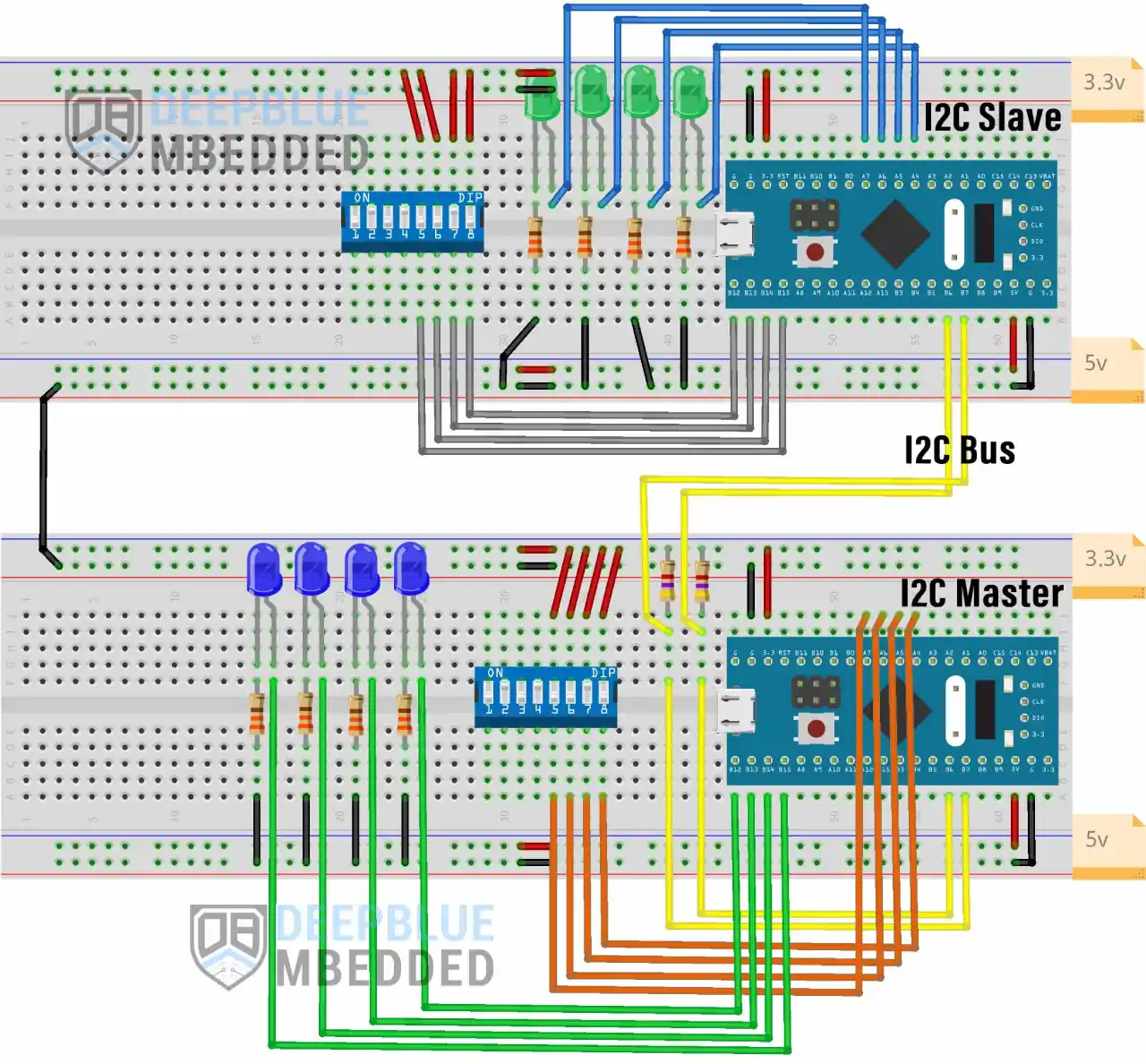
In this next example project, we’ll design a two-way communication system between two STM32 microcontrollers using the following configuration:
- STM32 I2C Master (TxRx) <-> STM32 I2C Slave (RxTx)
Everything else will be exactly the same as the previous projects. Except for the wiring and the application code for the master and the slave STM32 microcontrollers. Which will be as shown hereafter.
STM32 I2C Slave (RxTx) <-> I2C Master (TxRx) Wiring
STM32 I2C Slave Transceiver (RxTx) Example Code
Here is The Application Code For This Example Project (main.c)
|
1 2 3 4 5 6 7 8 9 10 11 12 13 14 15 16 17 18 19 20 21 22 23 24 25 26 27 28 29 30 31 32 33 34 35 36 37 38 39 40 41 42 43 44 45 46 47 48 49 50 51 52 53 54 55 56 57 58 59 60 61 62 63 64 65 66 67 68 69 70 71 72 73 |
/* * LAB Name: STM32 I2C (Slave RxTx) Example * Author: Khaled Magdy * For More Info Visit: www.DeepBlueMbedded.com */ #include "main.h" I2C_HandleTypeDef hi2c1; uint8_t TxData = 0x00; uint8_t RxData = 0x00; void SystemClock_Config(void); static void MX_GPIO_Init(void); static void MX_I2C1_Init(void); int main(void) { HAL_Init(); SystemClock_Config(); MX_GPIO_Init(); MX_I2C1_Init(); HAL_I2C_EnableListen_IT(&hi2c1); while (1) { } } void HAL_I2C_ListenCpltCallback (I2C_HandleTypeDef *hi2c) { if(hi2c->Instance == I2C1) { HAL_I2C_EnableListen_IT(&hi2c1); } } void HAL_I2C_AddrCallback(I2C_HandleTypeDef *hi2c, uint8_t TransferDirection, uint16_t AddrMatchCode) { if(hi2c->Instance == I2C1) { if(TransferDirection == I2C_DIRECTION_TRANSMIT) { HAL_I2C_Slave_Seq_Receive_IT(&hi2c1, &RxData, 1, I2C_FIRST_AND_LAST_FRAME); } else { HAL_I2C_Slave_Seq_Transmit_IT(&hi2c1, &TxData, 1, I2C_FIRST_AND_LAST_FRAME); } } } void HAL_I2C_SlaveRxCpltCallback(I2C_HandleTypeDef *hi2c) { if(hi2c->Instance == I2C1) { HAL_GPIO_WritePin(GPIOA, GPIO_PIN_4, (RxData & 0x01)); HAL_GPIO_WritePin(GPIOA, GPIO_PIN_5, (RxData & 0x02)); HAL_GPIO_WritePin(GPIOA, GPIO_PIN_6, (RxData & 0x04)); HAL_GPIO_WritePin(GPIOA, GPIO_PIN_7, (RxData & 0x08)); } } void HAL_I2C_SlaveTxCpltCallback(I2C_HandleTypeDef *hi2c) { if(hi2c->Instance == I2C1) { TxData = 0x00; TxData |= (HAL_GPIO_ReadPin(GPIOB, GPIO_PIN_12) << 0); TxData |= (HAL_GPIO_ReadPin(GPIOB, GPIO_PIN_13) << 1); TxData |= (HAL_GPIO_ReadPin(GPIOB, GPIO_PIN_14) << 2); TxData |= (HAL_GPIO_ReadPin(GPIOB, GPIO_PIN_15) << 3); } } |
STM32 I2C Master Transceiver (TxRx) Example Code
Here is The Application Code For This Example Project (main.c)
|
1 2 3 4 5 6 7 8 9 10 11 12 13 14 15 16 17 18 19 20 21 22 23 24 25 26 27 28 29 30 31 32 33 34 35 36 37 38 39 40 41 42 43 44 45 46 47 48 49 50 51 52 53 54 55 56 57 |
/* * LAB Name: STM32 I2C (Master TxRx) Example * Author: Khaled Magdy * For More Info Visit: www.DeepBlueMbedded.com */ #include "main.h" #define I2C_SLAVE_ADDRESS 0x33 I2C_HandleTypeDef hi2c1; uint8_t TxData = 0x00; uint8_t RxData = 0x00; void SystemClock_Config(void); static void MX_GPIO_Init(void); static void MX_I2C1_Init(void); int main(void) { HAL_Init(); SystemClock_Config(); MX_GPIO_Init(); MX_I2C1_Init(); while (1) { TxData = 0x00; TxData |= (HAL_GPIO_ReadPin(GPIOA, GPIO_PIN_4) << 0); TxData |= (HAL_GPIO_ReadPin(GPIOA, GPIO_PIN_5) << 1); TxData |= (HAL_GPIO_ReadPin(GPIOA, GPIO_PIN_6) << 2); TxData |= (HAL_GPIO_ReadPin(GPIOA, GPIO_PIN_7) << 3); if( HAL_I2C_IsDeviceReady(&hi2c1, (I2C_SLAVE_ADDRESS<<1), HAL_MAX_DELAY, 1) == HAL_OK ) { HAL_I2C_Master_Seq_Transmit_IT(&hi2c1, (I2C_SLAVE_ADDRESS<<1), &TxData, 1, I2C_FIRST_AND_LAST_FRAME); } HAL_Delay(50); } } void HAL_I2C_MasterTxCpltCallback(I2C_HandleTypeDef *hi2c) { if(hi2c->Instance == I2C1) { HAL_I2C_Master_Seq_Receive_IT(&hi2c1, (I2C_SLAVE_ADDRESS<<1), &RxData, 1, I2C_FIRST_AND_LAST_FRAME); } } void HAL_I2C_MasterRxCpltCallback(I2C_HandleTypeDef *hi2c) { if(hi2c->Instance == I2C1) { HAL_GPIO_WritePin(GPIOB, GPIO_PIN_12, (RxData & 0x01)); HAL_GPIO_WritePin(GPIOB, GPIO_PIN_13, (RxData & 0x02)); HAL_GPIO_WritePin(GPIOB, GPIO_PIN_14, (RxData & 0x04)); HAL_GPIO_WritePin(GPIOB, GPIO_PIN_15, (RxData & 0x08)); } } |
STM32 I2C Slave Transceiver (RxTx) <-> Master Transceiver (TxRx) Testing
This is the real hardware testing result for this example project on my two STM32 Blue Pill boards. Note how the LEDs on each side react to the DIP switches changing on the other I2C device, which verifies that the two-way communication is properly established. The STM32 I2C master is sending and receiving data to/from the other STM32 I2C slave device.
Required Parts For STM32 Examples
All the example Code/LABs/Projects in this STM32 Series of Tutorials are done using the Dev boards & Electronic Parts below:
Download Attachments
Download STM32 I2C Slave Example Projects
Download all attachment files for this Article/Tutorial (project files, schematics, code, etc.) using the link below. Everything is tested and verified to work on real hardware, as you’ve seen in the demo videos & screenshots. Please consider supporting my work if it helped you.
Wrap Up
In conclusion, we’ve explored how to set up the STM32 I2C peripheral in Slave mode to transmit and receive data on the I2C bus. We’ve established one-way and two-way communication between two STM32 boards using I2C, with the STM32 slave acting as a receiver, transmitter, and transceiver.
You can build on top of the examples provided in this tutorial and explore the other parts of this STM32 I2C tutorial series linked below.