In this tutorial, we’ll discuss how to build an STM32 HTTP client over WiFi to send HTTP GET and POST requests and parse JSON replies, using an ESP32-C3 as a WiFi co-processor. You’ll learn how the ESP32-C3’s built-in HTTP client (ESP-AT) works, how to send GET and POST requests from an STM32 Blue Pill over plain HTTP and HTTPS, and how to parse a JSON reply on the STM32 with cJSON, jsmn, or a few lines of your own code.
Then, we’ll build three STM32 HTTP client example projects with our ESP_AT driver: HTTP and HTTPS GET requests, a JSON POST of a sensor reading, and a weather client that parses a real JSON API reply. We’ll also measure how long each request takes and compare the three JSON parsers on the STM32. This is the fourth part of our STM32 WiFi tutorial series. Without further ado, let’s get right into it!
Note: The STM32 code examples in this tutorial are tested with: STM32 Blue Pill (STM32F103C8T6), ESP32-C3 Core Board with ESP-AT firmware, cJSON, and jsmn.
STM32 HTTP Client: How It Works
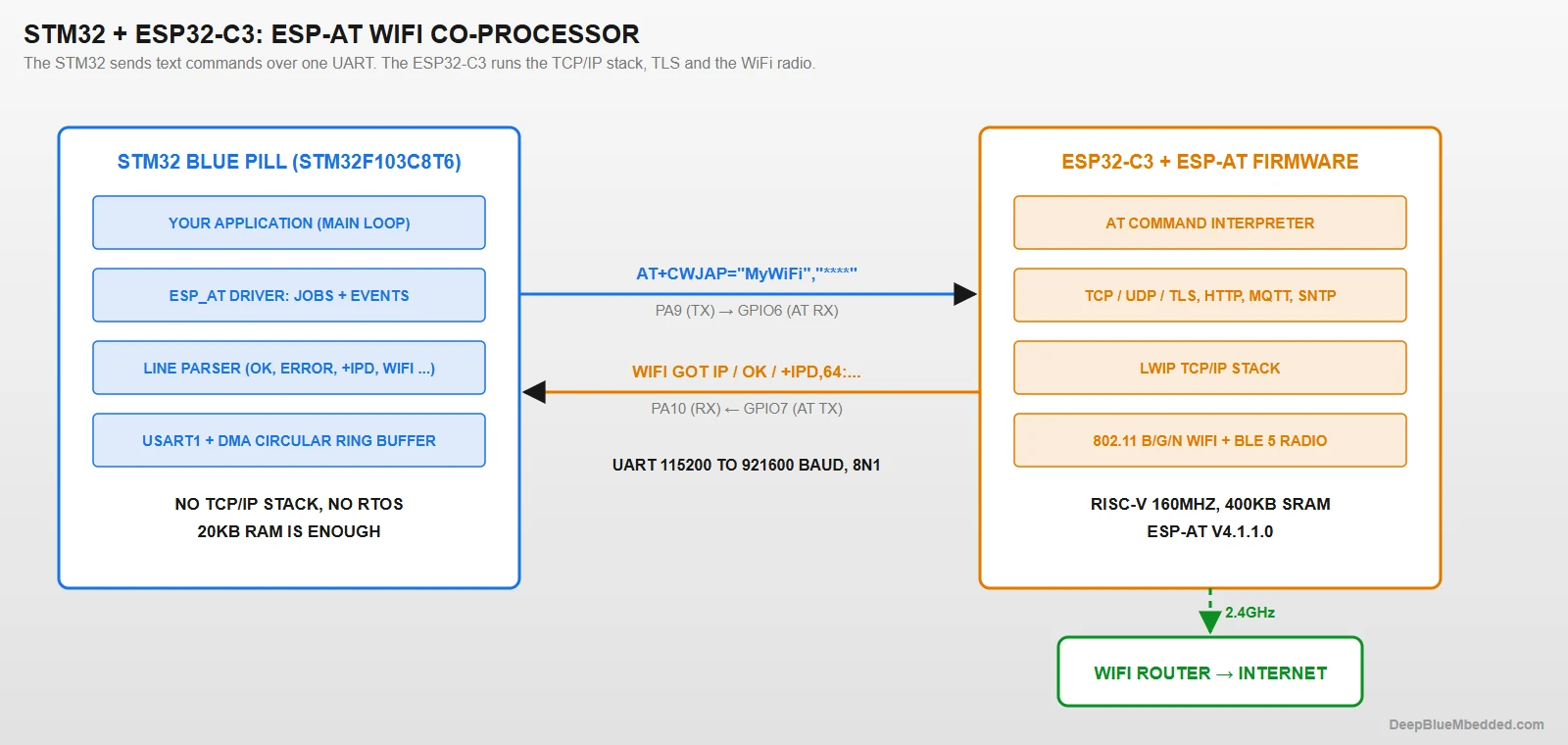
An HTTP request is a few lines of text sent over a TCP connection, and the server answers with a status line, headers, and a body (often JSON). On a microcontroller with its own TCP/IP stack, you’d build the request, open the TCP (or TLS) connection, and parse the reply headers yourself. With an ESP32-C3 running ESP-AT, all of that runs on the ESP32-C3: the STM32 sends one AT command with the URL, and it receives only the body.
| Step | Who Does It | AT Command |
|---|---|---|
| DNS lookup, TCP connection, TLS handshake (HTTPS) | ESP32-C3 | – |
| GET request | STM32 sends one command | AT+HTTPCGET="<url>" |
| POST request with a short body | STM32 sends one command | AT+HTTPCLIENT=3,<type>,"<url>",,,<1/2>,"<data>" |
| POST request with a long or binary body | STM32 sends the command, then the body after the > prompt | AT+HTTPCPOST="<url>",<length> |
| Reply body | ESP32-C3 sends it to the STM32 in frames | +HTTPCGET:<n>,<data>, +HTTPCLIENT:<n>,<data> |
| JSON parsing | STM32 | – |
The STM32 side is our ESP_AT driver from the ESP32 AT commands with STM32 tutorial (wiring, CubeMX configuration, and the driver basics are all there). For this tutorial, the driver gained two new jobs: ESP_AT_HttpGet() and ESP_AT_HttpPost(). They pick the right AT command by themselves, read the body frames by their length, and hand the body to your code in chunks.
STM32 HTTP Client Wiring and CubeMX Configuration
Required Parts
| QTY. | Component Name | Amazon.com | AliExpress |
|---|---|---|---|
| 1 | STM32 Blue Pill (STM32F103C8T6) | Amazon | AliExpress |
| 1 | ST-Link V2 Debugger | Amazon | AliExpress |
| 1 | ESP32-C3 board (ESP32-C3 SuperMini; we use the WeAct ESP32-C3 Core Board) | Amazon | AliExpress |
| 1 | USB-TTL (UART) Converter, 3.3V | Amazon | AliExpress |
| 1 | BreadBoard | Amazon | AliExpress |
| 1 | Jumper Wires Pack | Amazon | AliExpress |
STM32 ESP32-C3 Wiring
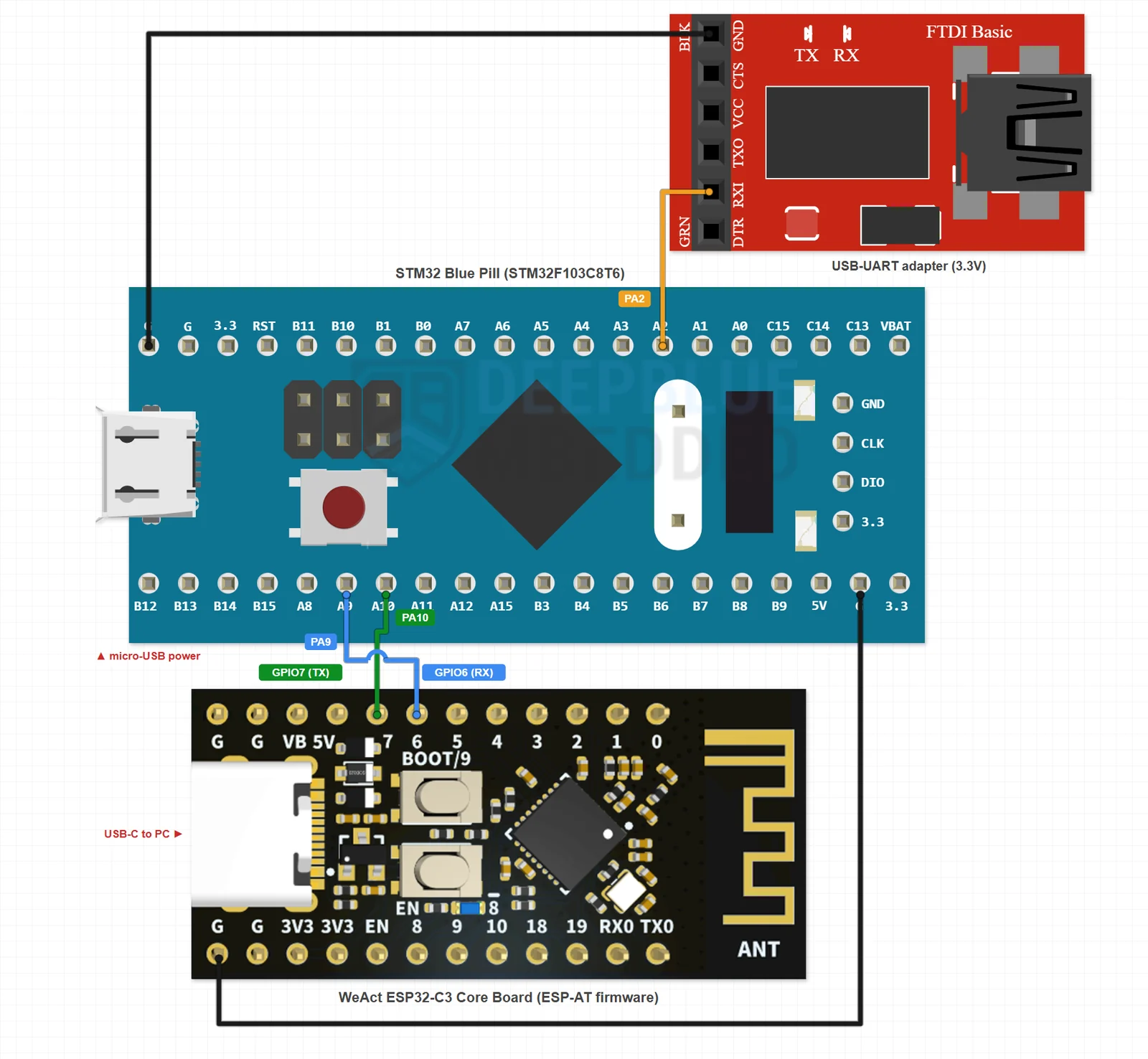
The wiring is the same as in the previous tutorial: the STM32’s USART1 goes to the ESP32-C3’s AT port, and USART2’s TX pin goes to a USB-TTL converter for the log. The ESP32-C3 needs the ESP-AT firmware (the previous tutorial shows how to flash it).
PA9 USART1 TX, goes to the ESP32-C3 GPIO6 (AT RX).
PA10 USART1 RX, goes to the ESP32-C3 GPIO7 (AT TX).
PA2 USART2 TX, goes to the USB-TTL converter’s RX: the log to your PC at 115200 baud.
GND Goes to the ESP32-C3 GND and the USB-TTL GND: common ground.
STM32 CubeMX Configuration
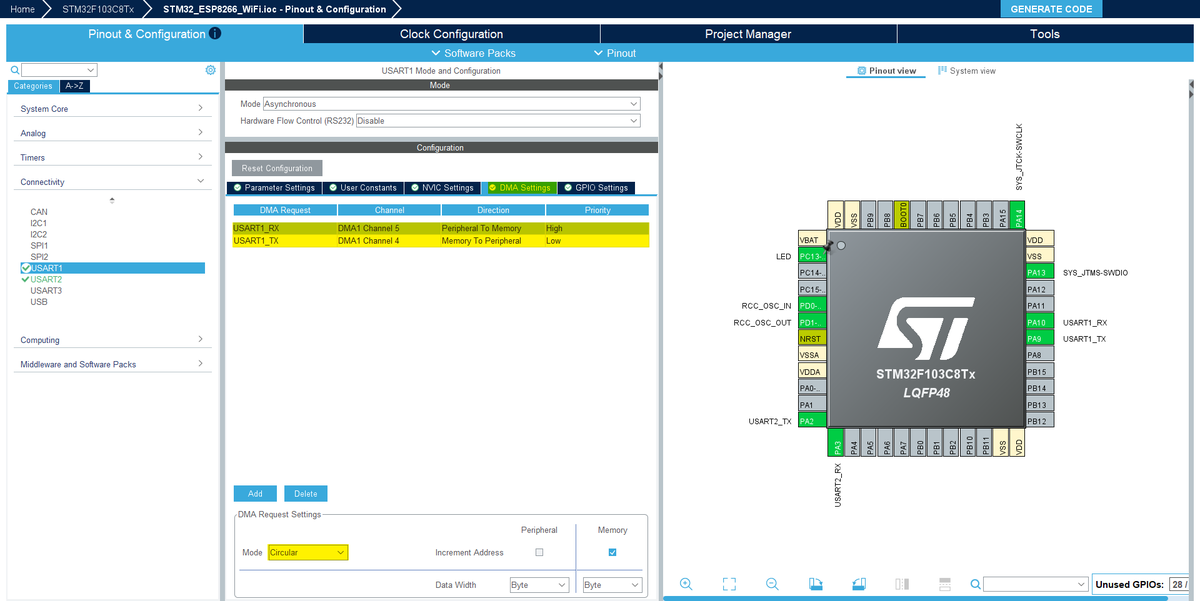
The CubeMX configuration is also the same: USART1 at 115200 baud with RX DMA in Circular mode and the USART1 global interrupt for the ESP32-C3, USART2 for the log, PC13 as the LED output, and the 72MHz clock. The ESP32 AT commands tutorial shows every step with screenshots. This is the DMA setting that matters most:
Note: For the cJSON example, increase the heap in CubeMX (Project Manager > Linker Settings > Minimum Heap Size) from the default 0x200 to 0x1000. cJSON allocates its tree with malloc, and 0x200 (512 bytes) is too small for a typical API reply.
STM32 HTTP Client Functions (ESP_AT Driver)
These are the two new driver functions. Both are non-blocking jobs that end with a ESP_AT_EVT_JOB_DONE event, and both have a _Blocking version for simple programs:
| Function | What It Does |
|---|---|
ESP_AT_HttpGet(&esp, url) | GET request over HTTP or HTTPS (from the URL). Long URLs (over 160 characters) go through AT+HTTPURLCFG by themselves |
ESP_AT_HttpPost(&esp, url, contentType, body, len) | POST request. Short one-line bodies use AT+HTTPCLIENT, longer or binary bodies use AT+HTTPCPOST |
ESP_AT_EVT_HTTP_DATA event | The reply body, in chunks of up to 256 bytes: d->data, d->len, and d->remaining |
esp.httpStatus | 200 on success, the HTTP error code (404, 500…) on failure, 0 if there was no connection |
esp.httpBodyLen | The number of body bytes received |
ESP-AT doesn’t report the HTTP status code on success, only on failure (as an ERR CODE line with AT+SYSLOG=1, which the driver turns on). So esp.httpStatus is 200 whenever the request worked. The table below lists the other limits we found in ESP-AT v4.1.1.0, measured on our ESP32-C3 and checked against Espressif’s HTTP AT command documentation:
| Topic | What ESP-AT v4.1.1.0 Does |
|---|---|
| Redirects (3xx) | Not followed. The request returns OK with the redirect page as the body, so request the final URL |
| Custom headers | AT+HTTPCHEAD sets headers for all later requests (not wrapped by the driver yet) |
| HTTPS certificates | Not checked by the default firmware: HTTPS here is encrypted, but the server is not authenticated |
| Connection reuse | None: every request opens a new connection, so every HTTPS request repeats the TLS handshake |
| Largest body tested | 60,000 bytes in 5.7 seconds (limited by the 115200 baud UART) |
| Longest URL tested | 220 characters (through AT+HTTPURLCFG) |
STM32 HTTP Client Example 1: HTTP GET Request
In the first example project, the STM32 joins WiFi and sends two GET requests: one over plain HTTP to httpbin.org (a test service that echoes the request back), and one over HTTPS to the Open-Meteo weather API, which needs no API key. It prints each reply body, its size, and how long the request took.
Wiring: PA9 to ESP32-C3 GPIO6, PA10 to GPIO7, PA2 to the USB-TTL RX, and GND to both.
Write your WiFi name and password in Core/Inc/wifi_secrets.h:
|
1 2 |
#define WIFI_SSID "YOUR_WIFI_NAME" #define WIFI_PASSWORD "YOUR_WIFI_PASSWORD" |
Here is The Application Code For This Example Project (main.c). Only the USER CODE sections are shown; the rest of the file is generated by CubeMX:
|
1 2 3 4 5 6 7 8 9 10 11 12 13 14 15 16 17 18 19 20 21 22 23 24 25 26 27 28 29 30 31 32 33 34 35 36 37 38 39 40 41 42 43 44 45 46 47 48 49 50 51 52 53 54 55 56 57 58 59 60 61 62 63 64 65 66 67 68 69 70 71 72 73 74 75 76 77 78 79 80 81 82 83 84 85 86 87 88 89 90 91 92 93 94 95 96 97 98 99 100 101 102 103 |
/* USER CODE BEGIN Includes */ #include <stdio.h> #include <string.h> #include <stdarg.h> #include "ESP_AT.h" #include "wifi_secrets.h" /* USER CODE END Includes */ /* USER CODE BEGIN 0 */ /* One handle per ESP module */ static ESP_AT_HandleType esp; /* printf-style log on USART2 (the USB-UART adapter to the PC) */ static void Log(const char *fmt, ...) __attribute__((format(printf, 1, 2))); static void Log(const char *fmt, ...) { char buf[200]; va_list ap; va_start(ap, fmt); int n = vsnprintf(buf, sizeof(buf), fmt, ap); va_end(ap); if (n > (int)sizeof(buf) - 1) n = (int)sizeof(buf) - 1; if (n > 0) HAL_UART_Transmit(&huart2, (uint8_t *)buf, (uint16_t)n, 100); } /* Driver traffic log: ">>" = sent to the module, "<<" = received, "--" = driver note */ static void OnTrace(ESP_AT_HandleType *h, ESP_AT_TraceType type, const char *text) __attribute__((unused)); static void OnTrace(ESP_AT_HandleType *h, ESP_AT_TraceType type, const char *text) { (void)h; Log("%s %s\r\n", (type == ESP_AT_TRACE_TX) ? ">>" : (type == ESP_AT_TRACE_RX) ? "<<" : "--", text); } /* The HAL stops the DMA reception after a UART error; the driver restarts it */ void HAL_UART_ErrorCallback(UART_HandleTypeDef *huart) { ESP_AT_UART_ErrorCallback(&esp, huart); } /* The requests this demo makes (no API key needed for either) */ #define URL_HTTP "http://httpbin.org/get" #define URL_HTTPS "https://api.open-meteo.com/v1/forecast?latitude=40.71&longitude=-74.01¤t=temperature_2m" /* The body arrives in chunks: print each one as text */ static void OnEvent(ESP_AT_HandleType *h, ESP_AT_EventType ev, const ESP_AT_EventDataType *d) { (void)h; if (ev == ESP_AT_EVT_HTTP_DATA || ev == ESP_AT_EVT_DATA) { HAL_UART_Transmit(&huart2, (uint8_t *)d->data, d->len, 1000); /* the body as it arrives */ } } /* One GET: time it, print status and size */ static void Get(const char *url) { Log("\r\n--- GET %s\r\n", url); uint32_t t0 = HAL_GetTick(); ESP_AT_StatusType s = ESP_AT_HttpGet_Blocking(&esp, url); Log("\r\n--- %s, HTTP %u, %lu bytes in %lu ms\r\n", ESP_AT_StatusText(s), esp.httpStatus, (unsigned long)esp.httpBodyLen, (unsigned long)(HAL_GetTick() - t0)); } /* Old ESP8266 firmware (NonOS AT 1.x, AT 0.2x) has no HTTP commands: send the request over plain TCP */ static void RawTcpGet(void) { static const char req[] = "GET /get HTTP/1.1\r\nHost: httpbin.org\r\nConnection: close\r\n\r\n"; Log("\r\n--- no AT+HTTPCGET on this firmware: raw TCP GET http://httpbin.org/get\r\n"); if (ESP_AT_Connect_Blocking(&esp, 0, ESP_AT_LINK_TCP, "httpbin.org", 80) != ESP_AT_OK) { Log("connect failed\r\n"); return; } ESP_AT_Send_Blocking(&esp, 0, req, sizeof(req) - 1); uint32_t t0 = HAL_GetTick(); while (ESP_AT_IsLinkOpen(&esp, 0) && HAL_GetTick() - t0 < 10000) ESP_AT_Process(&esp); /* server closes */ Log("\r\n--- raw TCP GET done (the reply includes the status line and headers)\r\n"); } /* USER CODE END 0 */ /* Inside main(), after the MX_..._Init() calls */ /* USER CODE BEGIN 2 */ ESP_AT_ConfigType cfg = {0}; cfg.huart = &huart1; cfg.onEvent = OnEvent; /* no trace: the body itself is the output */ Log("\r\n=== ESP_AT Demo 5: HTTP and HTTPS GET ===\r\n"); if (ESP_AT_Init(&esp, &cfg) != ESP_AT_OK) Error_Handler(); if (ESP_AT_Begin_Blocking(&esp) != ESP_AT_OK) { Log("no module\r\n"); Error_Handler(); } Log("Module: %s (%s)\r\n", esp.version, ESP_AT_FirmwareText(esp.firmware)); if (ESP_AT_WiFiJoin_Blocking(&esp, WIFI_SSID, WIFI_PASSWORD) != ESP_AT_OK) { Log("join failed\r\n"); Error_Handler(); } Log("Joined, IP %s\r\n", esp.ip); if (esp.features & ESP_AT_FEAT_HTTP) { Get(URL_HTTP); Get(URL_HTTPS); } else RawTcpGet(); Log("\r\nDemo 5 done.\r\n"); /* USER CODE END 2 */ /* Inside while (1) */ /* USER CODE BEGIN 3 */ ESP_AT_Process(&esp); } /* USER CODE END 3 */ |
STM32 HTTP GET Example Code Explanation
OnEvent() receives the reply body as ESP_AT_EVT_HTTP_DATA events and prints each chunk as it arrives, so the STM32 never needs a buffer as big as the whole reply. Get() calls ESP_AT_HttpGet_Blocking(), which sends AT+HTTPCGET and returns when the whole body has arrived. The URL decides HTTP or HTTPS, nothing else changes.
If the module runs the old ESP8266 NonOS AT firmware, which has no HTTP commands, ESP_AT_HttpGet() returns ESP_AT_ERROR_UNSUPPORTED, and the example falls back to RawTcpGet(): it opens a TCP connection to port 80 and writes the HTTP request text itself. That’s how an HTTP request looks on the wire, and it works on any AT firmware.
STM32 HTTP GET Example Testing
This is the real hardware testing result for this example project on my Blue Pill and ESP32-C3 (my public IP address in httpbin’s "origin" field is hidden):
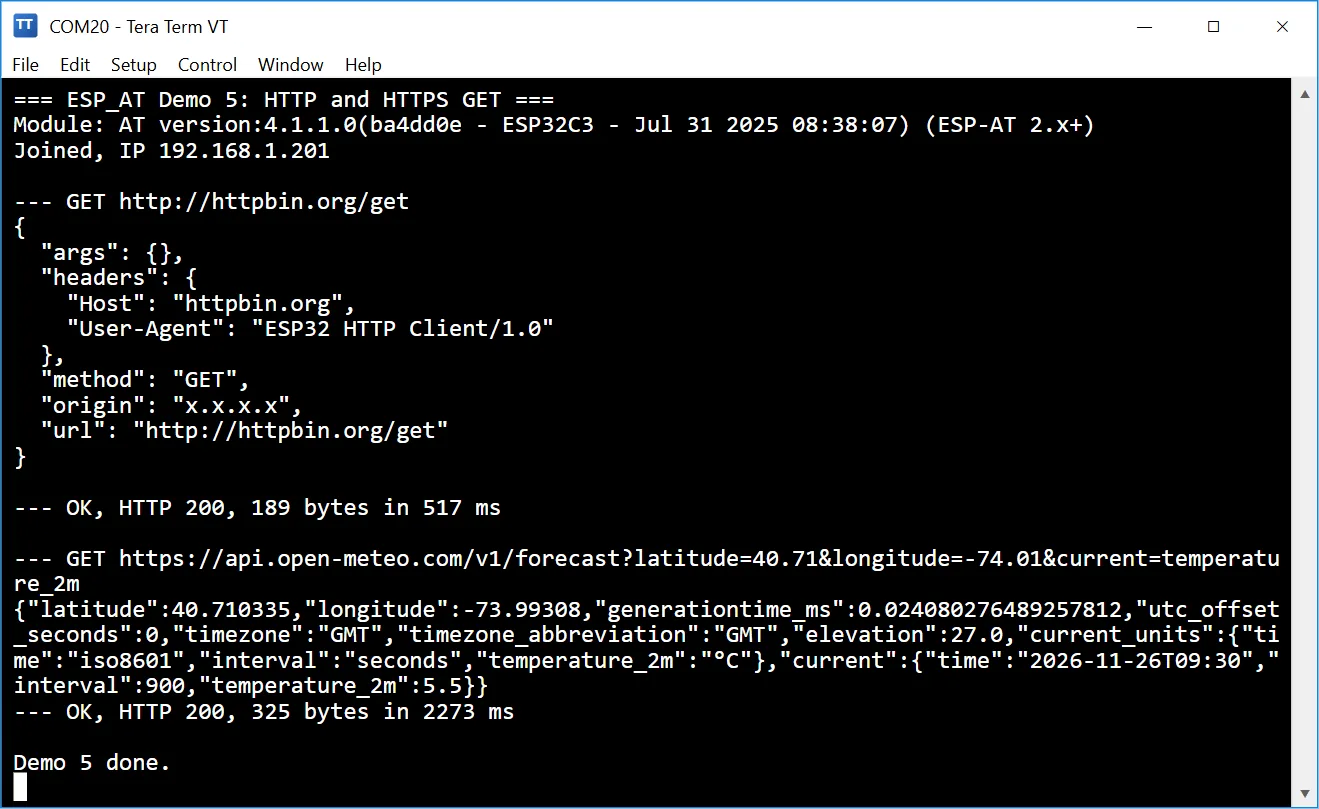
The plain HTTP GET took about half a second. The HTTPS GET to Open-Meteo took about 2 seconds, because the ESP32-C3 sets up a new TLS session for every request.
STM32 HTTP Client Example 2: HTTP POST Request (JSON)
In this example project, the STM32 builds a small JSON document from a sensor reading and POSTs it over HTTPS to httpbin.org every 15 seconds. httpbin sends back what it received, so we can see that the server got valid JSON with the right Content-Type. In a real project, the same call sends your data to your own server, a REST API, or a cloud dashboard.
Here is The Application Code For This Example Project (main.c). Only the USER CODE sections are shown; the rest of the file is generated by CubeMX:
|
1 2 3 4 5 6 7 8 9 10 11 12 13 14 15 16 17 18 19 20 21 22 23 24 25 26 27 28 29 30 31 32 33 34 35 36 37 38 39 40 41 42 43 44 45 46 47 48 49 50 51 52 53 54 55 56 57 58 59 60 61 62 63 64 65 66 67 68 69 70 71 72 73 74 75 76 77 78 79 80 81 82 83 84 85 86 87 88 89 90 91 92 93 |
/* USER CODE BEGIN Includes */ #include <stdio.h> #include <string.h> #include <stdarg.h> #include "ESP_AT.h" #include "wifi_secrets.h" /* USER CODE END Includes */ /* USER CODE BEGIN 0 */ /* One handle per ESP module */ static ESP_AT_HandleType esp; /* printf-style log on USART2 (the USB-UART adapter to the PC) */ static void Log(const char *fmt, ...) __attribute__((format(printf, 1, 2))); static void Log(const char *fmt, ...) { char buf[200]; va_list ap; va_start(ap, fmt); int n = vsnprintf(buf, sizeof(buf), fmt, ap); va_end(ap); if (n > (int)sizeof(buf) - 1) n = (int)sizeof(buf) - 1; if (n > 0) HAL_UART_Transmit(&huart2, (uint8_t *)buf, (uint16_t)n, 100); } /* Driver traffic log: ">>" = sent to the module, "<<" = received, "--" = driver note */ static void OnTrace(ESP_AT_HandleType *h, ESP_AT_TraceType type, const char *text) __attribute__((unused)); static void OnTrace(ESP_AT_HandleType *h, ESP_AT_TraceType type, const char *text) { (void)h; Log("%s %s\r\n", (type == ESP_AT_TRACE_TX) ? ">>" : (type == ESP_AT_TRACE_RX) ? "<<" : "--", text); } /* The HAL stops the DMA reception after a UART error; the driver restarts it */ void HAL_UART_ErrorCallback(UART_HandleTypeDef *huart) { ESP_AT_UART_ErrorCallback(&esp, huart); } /* httpbin.org/post answers with the JSON it received, so the reply shows what the server got */ #define URL_POST "https://httpbin.org/post" #define POST_EVERY_MS 15000U static char json[96]; /* must stay unchanged until the POST job ends */ static void OnEvent(ESP_AT_HandleType *h, ESP_AT_EventType ev, const ESP_AT_EventDataType *d) { (void)h; if (ev == ESP_AT_EVT_HTTP_DATA) HAL_UART_Transmit(&huart2, (uint8_t *)d->data, d->len, 1000); } /* A made-up sensor reading: the STM32's internal values would go here */ static int MakeReading(void) { uint32_t up = HAL_GetTick() / 1000U; int t10 = 245 + (int)(up % 7U); /* 24.5 .. 25.1 C, in tenths, no float printf */ return snprintf(json, sizeof(json), "{\"device\":\"stm32\",\"temp\":%d.%d,\"uptime\":%lu}", t10 / 10, t10 % 10, (unsigned long)up); } /* USER CODE END 0 */ /* Inside main(), after the MX_..._Init() calls */ /* USER CODE BEGIN 2 */ ESP_AT_ConfigType cfg = {0}; cfg.huart = &huart1; cfg.autoReconnect = 1; cfg.onEvent = OnEvent; Log("\r\n=== ESP_AT Demo 6: HTTPS POST of a JSON reading ===\r\n"); if (ESP_AT_Init(&esp, &cfg) != ESP_AT_OK) Error_Handler(); if (ESP_AT_Begin_Blocking(&esp) != ESP_AT_OK) { Log("no module\r\n"); Error_Handler(); } if (!(esp.features & ESP_AT_FEAT_HTTP)) { Log("%s has no HTTP client commands\r\n", esp.version); Error_Handler(); } if (ESP_AT_WiFiJoin_Blocking(&esp, WIFI_SSID, WIFI_PASSWORD) != ESP_AT_OK) { Log("join failed\r\n"); Error_Handler(); } Log("Joined, IP %s\r\n", esp.ip); uint32_t nextPost = HAL_GetTick(); /* USER CODE END 2 */ /* Inside while (1) */ /* USER CODE BEGIN 3 */ ESP_AT_Process(&esp); if ((int32_t)(HAL_GetTick() - nextPost) >= 0 && ESP_AT_IsWiFiConnected(&esp) && !ESP_AT_IsBusy(&esp)) { nextPost = HAL_GetTick() + POST_EVERY_MS; int n = MakeReading(); Log("\r\n--- POST %s\r\n %s\r\n", URL_POST, json); uint32_t t0 = HAL_GetTick(); ESP_AT_StatusType s = ESP_AT_HttpPost_Blocking(&esp, URL_POST, "application/json", json, (uint32_t)n); Log("\r\n--- %s, HTTP %u, %lu reply bytes in %lu ms (%s)\r\n", ESP_AT_StatusText(s), esp.httpStatus, (unsigned long)esp.httpBodyLen, (unsigned long)(HAL_GetTick() - t0), esp.httpPostInline ? "AT+HTTPCLIENT" : "AT+HTTPCPOST"); } } /* USER CODE END 3 */ |
STM32 HTTP POST Example Code Explanation
The JSON body is built with snprintf(), which is all you need to send JSON: no library, no heap. ESP_AT_HttpPost_Blocking(&esp, url, "application/json", body, len) sends it. A short one-line body like this one goes in a single AT+HTTPCLIENT command (the whole command must stay under 256 bytes, with quotes and commas escaped, which the driver does). A longer body, or any body with line breaks, goes through AT+HTTPCPOST: the driver sends the length, waits for the > prompt, and then sends the raw body.
STM32 HTTP POST Example Testing
This is the real hardware testing result for this example project:
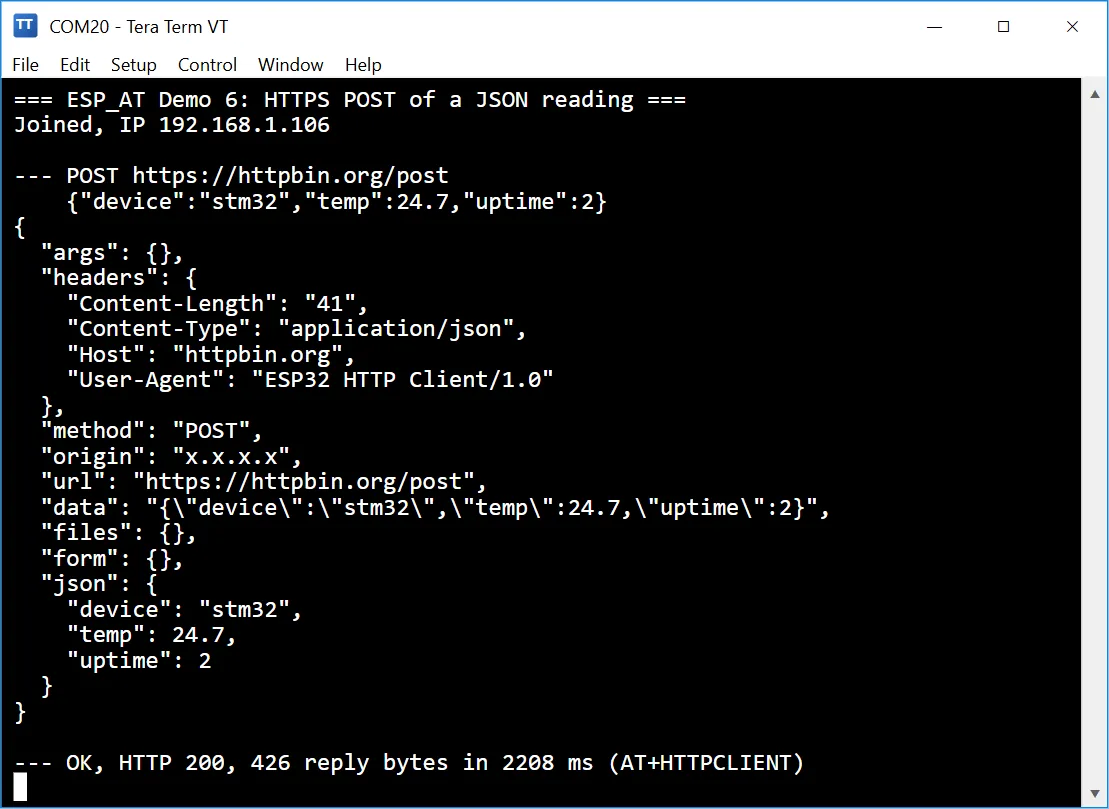
httpbin parsed our body as JSON (the "json" field) and saw the Content-Type: application/json header. The HTTPS POST took 2.2 seconds. Over plain HTTP, the same POST took about 0.7 seconds.
STM32 HTTP Client Example 3: Parse JSON on STM32 (cJSON)
In this example project, the STM32 asks the Open-Meteo API for the current temperature in New York once a minute, parses the JSON reply, and prints the temperature and the time. The reply looks like this (shortened):
|
1 |
{"latitude":40.710335,"longitude":-73.99308, ... ,"current":{"time":"2026-11-26T09:30","interval":900,"temperature_2m":5.5}} |
The example has three JSON parsers, selected with JSON_PARSER at the top of the code, so you can compare them on your own STM32:
- 1 = cJSON (MIT license): parses the whole reply into a tree on the heap, then you read any field by name. The easiest to use.
- 2 = jsmn (MIT license): a tokenizer with a fixed token array and no malloc. You walk the tokens to find a key.
- 3 = own extractor: a few lines of strstr() for one known reply format, no library at all.
To add cJSON to your project, copy cJSON.c and cJSON.h into the project (the example has them in a JSON folder with their license files), add the folder to the include paths, and increase the heap as described above.
Here is The Application Code For This Example Project (main.c). Only the USER CODE sections are shown; the rest of the file is generated by CubeMX:
|
1 2 3 4 5 6 7 8 9 10 11 12 13 14 15 16 17 18 19 20 21 22 23 24 25 26 27 28 29 30 31 32 33 34 35 36 37 38 39 40 41 42 43 44 45 46 47 48 49 50 51 52 53 54 55 56 57 58 59 60 61 62 63 64 65 66 67 68 69 70 71 72 73 74 75 76 77 78 79 80 81 82 83 84 85 86 87 88 89 90 91 92 93 94 95 96 97 98 99 100 101 102 103 104 105 106 107 108 109 110 111 112 113 114 115 116 117 118 119 120 121 122 123 124 125 126 127 128 129 130 131 132 133 134 135 136 137 138 139 140 141 142 143 144 145 146 147 148 149 150 151 152 153 154 155 156 157 158 159 160 161 162 163 164 165 166 167 168 169 170 171 172 173 174 175 176 177 178 179 180 181 182 183 184 185 186 187 188 189 190 191 192 193 194 195 196 197 198 199 200 201 202 203 204 205 206 207 208 209 210 211 212 213 214 215 216 217 218 219 220 221 222 223 224 225 226 227 228 229 230 231 232 233 234 235 236 237 238 239 240 241 242 243 244 245 246 247 248 249 250 251 252 253 254 255 256 257 258 259 260 261 262 263 264 |
/* USER CODE BEGIN Includes */ #include <stdio.h> #include <string.h> #include <stdarg.h> #include "ESP_AT.h" #include "wifi_secrets.h" /* USER CODE END Includes */ /* USER CODE BEGIN 0 */ /* One handle per ESP module */ static ESP_AT_HandleType esp; /* printf-style log on USART2 (the USB-UART adapter to the PC) */ static void Log(const char *fmt, ...) __attribute__((format(printf, 1, 2))); static void Log(const char *fmt, ...) { char buf[200]; va_list ap; va_start(ap, fmt); int n = vsnprintf(buf, sizeof(buf), fmt, ap); va_end(ap); if (n > (int)sizeof(buf) - 1) n = (int)sizeof(buf) - 1; if (n > 0) HAL_UART_Transmit(&huart2, (uint8_t *)buf, (uint16_t)n, 100); } /* Driver traffic log: ">>" = sent to the module, "<<" = received, "--" = driver note */ static void OnTrace(ESP_AT_HandleType *h, ESP_AT_TraceType type, const char *text) __attribute__((unused)); static void OnTrace(ESP_AT_HandleType *h, ESP_AT_TraceType type, const char *text) { (void)h; Log("%s %s\r\n", (type == ESP_AT_TRACE_TX) ? ">>" : (type == ESP_AT_TRACE_RX) ? "<<" : "--", text); } /* The HAL stops the DMA reception after a UART error; the driver restarts it */ void HAL_UART_ErrorCallback(UART_HandleTypeDef *huart) { ESP_AT_UART_ErrorCallback(&esp, huart); } /* Which JSON parser this build uses (the article compares the three): * 1 = cJSON (builds a tree on the heap: easiest to use, needs malloc) * 2 = jsmn (tokenizer, fixed token array, no malloc) * 3 = own (a few lines of strstr, for one known reply format, no malloc) */ #ifndef JSON_PARSER #define JSON_PARSER 1 #endif #define URL_WEATHER "https://api.open-meteo.com/v1/forecast?latitude=40.71&longitude=-74.01¤t=temperature_2m" #define READ_EVERY_MS 60000U /* open-meteo updates "current" every 15 minutes */ #if JSON_PARSER == 1 #include <stdlib.h> #include "cJSON.h" #elif JSON_PARSER == 2 #include "jsmn.h" #define JSON_TOKENS 48U /* the open-meteo reply has about 30 tokens */ #endif static char body[1024]; /* the whole HTTP body, collected from the chunks */ static uint16_t bodyLen = 0; static uint8_t bodyCut = 0; static void OnEvent(ESP_AT_HandleType *h, ESP_AT_EventType ev, const ESP_AT_EventDataType *d) { (void)h; if (ev != ESP_AT_EVT_HTTP_DATA) return; for (uint16_t i = 0; i < d->len; i++) { if (bodyLen < sizeof(body) - 1) body[bodyLen++] = (char)d->data[i]; else bodyCut = 1; } body[bodyLen] = '\0'; } /* "21.3" or "-3.25" -> tenths (213, -33), without pulling in floating point */ static int TextToTenths(const char *p, const char *end) __attribute__((unused)); /* cJSON does not need it */ static int TextToTenths(const char *p, const char *end) { int sign = 1, v = 0, frac = -1; if (p < end && *p == '-') { sign = -1; p++; } for (; p < end; p++) { if (*p >= '0' && *p <= '9') { if (frac < 0) v = v * 10 + (*p - '0'); else if (frac == 0) { v = v * 10 + (*p - '0'); frac = 1; } else { if (*p >= '5' && frac == 1) v++; frac = 2; break; } } else if (*p == '.' && frac < 0) frac = 0; else break; } if (frac <= 0) v *= 10; return sign * v; } /* The two values this demo needs */ typedef struct { char time[20]; int tempTenths; int ok; } WeatherType; #if JSON_PARSER == 1 /* cJSON with counting allocators, so the demo can print the heap it really used */ static uint32_t heapNow = 0, heapPeak = 0; static void *CountMalloc(size_t n) { uint32_t *p = malloc(n + sizeof(uint32_t)); if (p == NULL) return NULL; *p = (uint32_t)n; heapNow += (uint32_t)n; if (heapNow > heapPeak) heapPeak = heapNow; return p + 1; } static void CountFree(void *q) { if (q == NULL) return; uint32_t *p = (uint32_t *)q - 1; heapNow -= *p; free(p); } static WeatherType Parse(const char *json) { WeatherType w = {0}; cJSON *root = cJSON_Parse(json); if (root == NULL) return w; cJSON *cur = cJSON_GetObjectItemCaseSensitive(root, "current"); cJSON *t = cJSON_GetObjectItemCaseSensitive(cur, "temperature_2m"); cJSON *time = cJSON_GetObjectItemCaseSensitive(cur, "time"); if (cJSON_IsNumber(t) && cJSON_IsString(time)) { double v = t->valuedouble * 10.0; w.tempTenths = (int)(v < 0 ? v - 0.5 : v + 0.5); strncpy(w.time, time->valuestring, sizeof(w.time) - 1); w.ok = 1; } cJSON_Delete(root); return w; } #elif JSON_PARSER == 2 static jsmntok_t tokens[JSON_TOKENS]; static int KeyIs(const char *js, const jsmntok_t *t, const char *key) { int n = t->end - t->start; return t->type == JSMN_STRING && (int)strlen(key) == n && strncmp(js + t->start, key, (size_t)n) == 0; } /* Index of the value of 'key' among the tokens inside the object at index 'obj', or -1 */ static int FindInObject(const char *js, int count, int obj, const char *key) { for (int i = obj + 1; i < count - 1 && tokens[i].start < tokens[obj].end; i++) if (KeyIs(js, &tokens[i], key)) return i + 1; return -1; } static WeatherType Parse(const char *json) { WeatherType w = {0}; jsmn_parser p; jsmn_init(&p); int count = jsmn_parse(&p, json, strlen(json), tokens, JSON_TOKENS); if (count < 1 || tokens[0].type != JSMN_OBJECT) return w; int cur = FindInObject(json, count, 0, "current"); if (cur < 0 || tokens[cur].type != JSMN_OBJECT) return w; int t = FindInObject(json, count, cur, "temperature_2m"); int tm = FindInObject(json, count, cur, "time"); if (t < 0 || tm < 0) return w; w.tempTenths = TextToTenths(json + tokens[t].start, json + tokens[t].end); int n = tokens[tm].end - tokens[tm].start; if (n > (int)sizeof(w.time) - 1) n = (int)sizeof(w.time) - 1; memcpy(w.time, json + tokens[tm].start, (size_t)n); w.ok = 1; return w; } #else /* Own extractor: fine for one API whose format you know, breaks if the server reorders keys * or adds a nested "current" somewhere else. */ static const char *After(const char *from, const char *key) { const char *p = (from != NULL) ? strstr(from, key) : NULL; if (p == NULL) return NULL; p += strlen(key); while (*p == ' ' || *p == ':') p++; return p; } static WeatherType Parse(const char *json) { WeatherType w = {0}; const char *cur = After(json, "\"current\""); const char *t = After(cur, "\"temperature_2m\""); const char *tm = After(cur, "\"time\""); if (t == NULL || tm == NULL || *tm != '"') return w; w.tempTenths = TextToTenths(t, t + 12); tm++; for (int i = 0; i < (int)sizeof(w.time) - 1 && tm[i] && tm[i] != '"'; i++) w.time[i] = tm[i]; w.ok = 1; return w; } #endif static void ReadWeather(void) { bodyLen = 0; bodyCut = 0; body[0] = '\0'; uint32_t t0 = HAL_GetTick(); ESP_AT_StatusType s = ESP_AT_HttpGet_Blocking(&esp, URL_WEATHER); uint32_t tGet = HAL_GetTick() - t0; if (s != ESP_AT_OK) { Log("GET failed: %s, HTTP %u\r\n", ESP_AT_StatusText(s), esp.httpStatus); return; } Log("\r\nGET %lu bytes in %lu ms%s:\r\n", (unsigned long)bodyLen, (unsigned long)tGet, bodyCut ? " (cut to the buffer)" : ""); HAL_UART_Transmit(&huart2, (uint8_t *)body, bodyLen, 1000); Log("\r\n"); uint32_t c0 = DWT->CYCCNT; WeatherType w = Parse(body); uint32_t cycles = DWT->CYCCNT - c0; if (!w.ok) { Log("JSON parse failed\r\n"); return; } int a = w.tempTenths < 0 ? -w.tempTenths : w.tempTenths; Log("New York, %s UTC: %s%d.%d C (parsed in %lu us", w.time, w.tempTenths < 0 ? "-" : "", a / 10, a % 10, (unsigned long)(cycles / (SystemCoreClock / 1000000U))); #if JSON_PARSER == 1 Log(", cJSON heap peak %lu bytes)\r\n", (unsigned long)heapPeak); #elif JSON_PARSER == 2 Log(", jsmn tokens %u x %u bytes)\r\n", (unsigned)JSON_TOKENS, (unsigned)sizeof(jsmntok_t)); #else Log(", own extractor)\r\n"); #endif } /* USER CODE END 0 */ /* Inside main(), after the MX_..._Init() calls */ /* USER CODE BEGIN 2 */ ESP_AT_ConfigType cfg = {0}; cfg.huart = &huart1; cfg.autoReconnect = 1; cfg.onEvent = OnEvent; CoreDebug->DEMCR |= CoreDebug_DEMCR_TRCENA_Msk; /* cycle counter, to time the parser */ DWT->CYCCNT = 0; DWT->CTRL |= DWT_CTRL_CYCCNTENA_Msk; #if JSON_PARSER == 1 cJSON_Hooks hooks = { CountMalloc, CountFree }; cJSON_InitHooks(&hooks); Log("\r\n=== ESP_AT Demo 7: HTTPS GET + JSON with cJSON ===\r\n"); #elif JSON_PARSER == 2 Log("\r\n=== ESP_AT Demo 7: HTTPS GET + JSON with jsmn ===\r\n"); #else Log("\r\n=== ESP_AT Demo 7: HTTPS GET + JSON with an own extractor ===\r\n"); #endif if (ESP_AT_Init(&esp, &cfg) != ESP_AT_OK) Error_Handler(); if (ESP_AT_Begin_Blocking(&esp) != ESP_AT_OK || !(esp.features & ESP_AT_FEAT_HTTP)) { Log("no ESP-AT module\r\n"); Error_Handler(); } if (ESP_AT_WiFiJoin_Blocking(&esp, WIFI_SSID, WIFI_PASSWORD) != ESP_AT_OK) { Log("join failed\r\n"); Error_Handler(); } uint32_t nextRead = HAL_GetTick(); /* USER CODE END 2 */ /* Inside while (1) */ /* USER CODE BEGIN 3 */ ESP_AT_Process(&esp); if ((int32_t)(HAL_GetTick() - nextRead) >= 0 && ESP_AT_IsWiFiConnected(&esp) && !ESP_AT_IsBusy(&esp)) { nextRead = HAL_GetTick() + READ_EVERY_MS; ReadWeather(); } } /* USER CODE END 3 */ |
STM32 JSON Parser Example Code Explanation
OnEvent() collects the body chunks into a 1KB buffer. With cJSON, Parse() calls cJSON_Parse(), reads "current", then "temperature_2m" and "time" inside it with cJSON_GetObjectItemCaseSensitive(), and frees the tree with cJSON_Delete(). The example plugs counting allocators into cJSON ( cJSON_InitHooks()), so it can print how much heap the parse really used.
STM32 JSON Parser Example Testing
This is the real hardware testing result for this example project with cJSON:
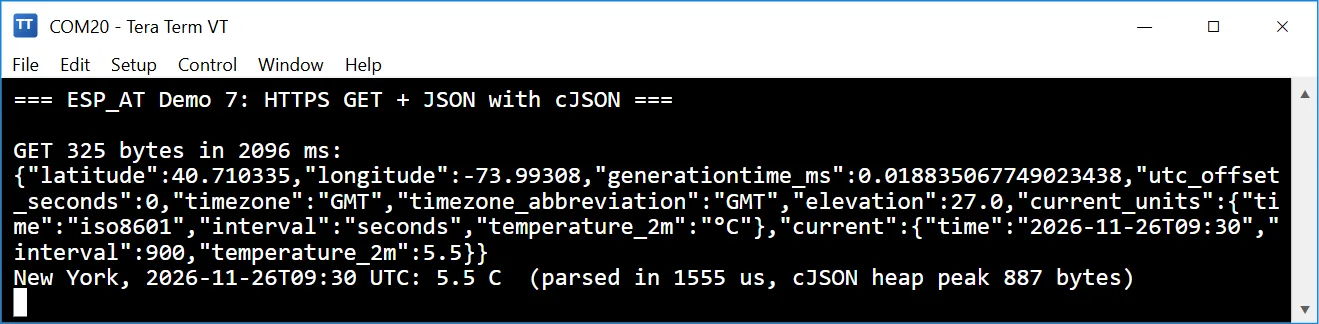
cJSON vs jsmn vs Own Parser on STM32
We built the same example with each parser (Release build) and parsed the same 325-byte Open-Meteo reply on the Blue Pill at 72MHz:
| Parser | Extra Flash | Extra RAM | Parse Time | Best For |
|---|---|---|---|---|
Own extractor (strstr) | baseline (20.5KB app) | none | 103µs | One known, fixed reply format |
| jsmn | +0.9KB | +768 bytes (48 tokens) | 675µs | Small MCUs, no heap, many fields |
| cJSON | +14.9KB (about 6KB of it is strtod, double math, and malloc) | heap peak 888 bytes | 1.56ms | Easy code, nested JSON, building JSON too |
All three are fast enough: even cJSON parses the reply in 1.56ms, while the HTTPS request itself takes about 2 seconds. The real cost is flash: cJSON adds 14.9KB, which is a lot on a 64KB STM32F103C8. For a Blue Pill reading a few fields from one API, jsmn is the best balance. For a bigger STM32, or JSON you build and change, cJSON is the most comfortable.
STM32 HTTP Client Measured: Request Times
These are the times we measured on the STM32, from sending the AT command to the end of the reply body, with the ESP32-C3 at 115200 baud:
| Request | HTTP | HTTPS |
|---|---|---|
| GET (httpbin, Open-Meteo, about 200 to 300 bytes) | 0.37 to 0.55s | 1.6 to 2.3s |
POST, short JSON body (AT+HTTPCLIENT) | 0.7s | 2.2 to 2.5s |
POST, 1.2KB body (AT+HTTPCPOST) | 1.0s | 2.75s |
| GET, 60,000-byte body | 5.7s (the UART at 115200 is the limit) | – |
HTTPS adds about 1.5 seconds to every request, because the ESP32-C3 opens a new TLS session each time. If your device sends data often, send it in batches, or use MQTT (a later part of this series), which keeps one connection open.
STM32 HTTP vs HTTPS on The Oscilloscope
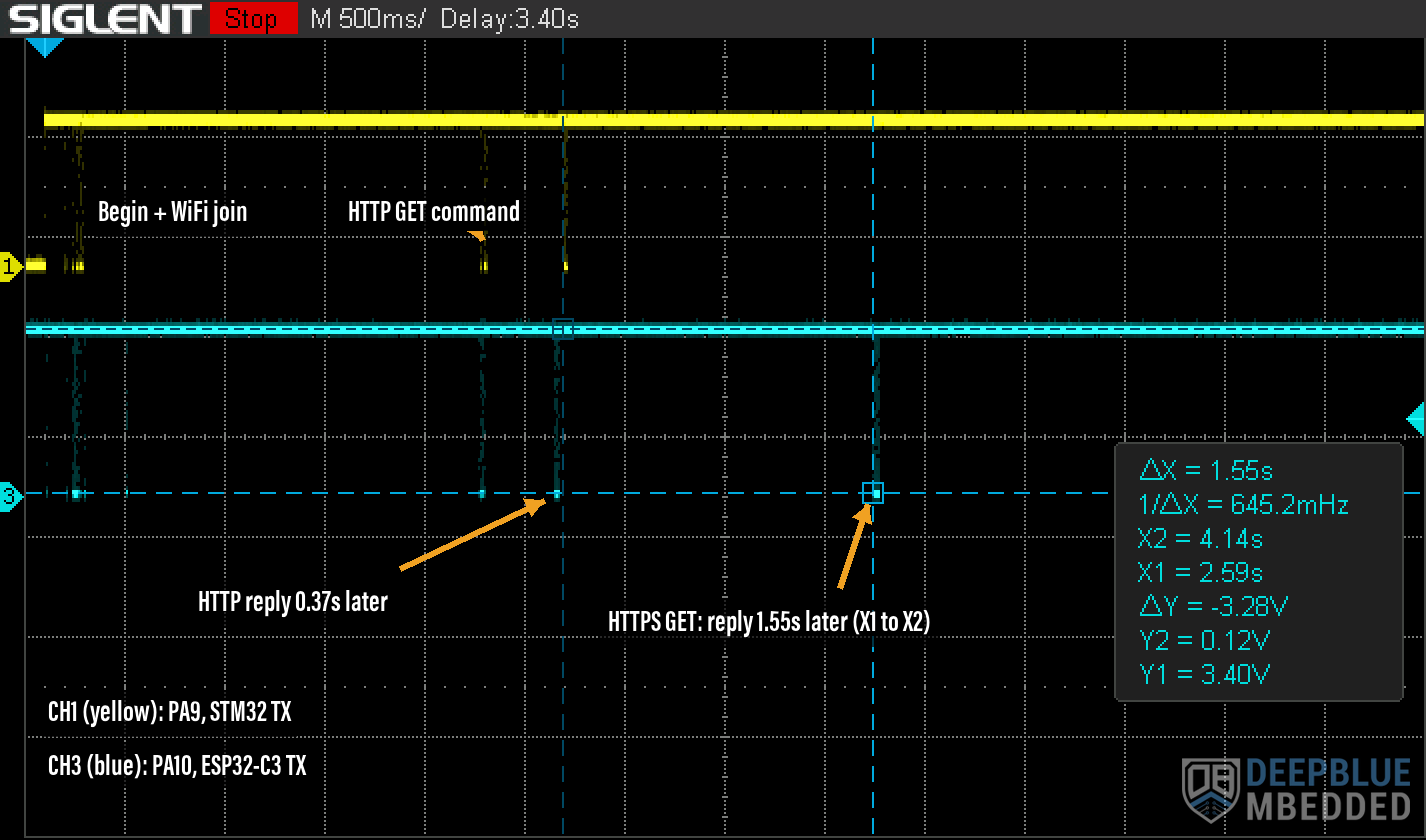
Here’s Example 1 on my oscilloscope captures. CH1 (yellow) is PA9, the STM32’s TX line to the ESP32-C3, and CH3 (blue) is PA10, the ESP32-C3’s TX line back to the STM32.
After the module check and the WiFi join, the STM32 sends the HTTP GET command, and the reply body comes back 0.37 seconds later. Then it sends the HTTPS GET command: the cursors show that its reply came 1.55 seconds later, and the UART lines stay idle for all that time while the ESP32-C3 does the TLS handshake:
STM32 HTTP Client Troubleshooting
The request returns ERROR with no status code
The ESP32-C3 couldn’t connect: check that WiFi is joined, that the URL starts with http:// or https://, and that the server is reachable. Some servers also refuse the ESP-AT TLS setup: in our tests, worldtimeapi.org failed every time while other HTTPS APIs worked.
I get a 3xx page instead of the data
ESP-AT doesn’t follow redirects. Request the final URL (for example, https:// instead of http://, or with the trailing slash the server expects).
cJSON_Parse() returns NULL
Usually the heap is too small (increase it to 0x800 to 0x1000 in CubeMX), or the body was cut because your receive buffer is smaller than the reply. Print the body first.
The HTTPS request takes 2 seconds
That’s the TLS handshake on the ESP32-C3, repeated for every request. Use plain HTTP on your local network, or send less often.
The POST body arrives broken or the command returns ERROR
An AT+HTTPCLIENT POST must fit in one 256-byte command, on one line. For longer bodies, use AT+HTTPCPOST (our driver switches automatically).
HTTP doesn’t work with my ESP8266
The ESP8266 NonOS AT firmware has no HTTP commands. Use a TCP connection and write the request text yourself, as the fallback in Example 1 does, or use an ESP32-C3.
STM32 HTTP Client FAQ
Can an STM32 send HTTP requests without an ESP32?
Yes, if the STM32 has a network interface and a TCP/IP stack, for example, an STM32F4/F7/H7 with Ethernet and LwIP, or an STM32 with a W5500 Ethernet chip. Over WiFi, the simplest way is an ESP32 co-processor like in this tutorial.
Is HTTPS secure with ESP-AT?
The data is encrypted, but the default ESP-AT firmware doesn’t verify the server’s certificate, so it can’t detect a fake server. For real security, build ESP-AT with certificate checking and load the server’s CA certificate.
Which JSON library is best for STM32?
For small MCUs like the Blue Pill, jsmn: under 1KB of flash and no heap. For larger STM32s, or when you also build JSON, cJSON is easier to use. Our measurements are in the comparison table above.
How do I send sensor data to a server from STM32?
Build a JSON string with snprintf() and POST it, as in Example 2. Point the URL at your server or a cloud service’s REST API, and send an API key in the URL or a header if the service needs one.
STM32 WiFi Tutorial Series
This tutorial is the fourth part of our STM32 WiFi tutorial series:
| Part | Tutorial | What You’ll Build |
|---|---|---|
| 1 | STM32 WiFi | Choosing a WiFi module, quick start, ESP32-C3 vs ESP8266 measured |
| 2 | ESP8266 AT Commands With STM32 | ESP8266 AT firmware, commands, and our ESP_AT driver |
| 3 | ESP32 AT Commands With STM32 | ESP-AT firmware, commands, SNTP time, and our ESP_AT driver |
| 4 | STM32 HTTP Client Over WiFi (this tutorial) | GET, POST, HTTPS, and JSON parsing |
| 5 | STM32 Web Server | Control GPIOs and read sensors from a browser |
| 6 | STM32 MQTT | Publish and subscribe, Home Assistant |
| 7 | STM32 OTA Firmware Update | Update the STM32’s firmware over WiFi |
| 8 | STM32 WebSocket | Real-time data with an ESP32 smart bridge |
Download STM32 HTTP Client Example Projects (GET, POST, JSON)
Download all attachment files for this Article/Tutorial (project files, schematics, code, etc.) using the link below. Everything is tested and verified to work on real hardware, as you’ve seen in the demo videos & screenshots. Please consider supporting my work if it helped you.
Wrap Up
To conclude this tutorial, we’ve built an STM32 HTTP client over WiFi with an ESP32-C3 and our ESP_AT driver. We sent HTTP and HTTPS GET requests, POSTed a JSON sensor reading, and parsed a real JSON API reply on the STM32 with cJSON, jsmn, and a few lines of our own code. The measurements showed that HTTPS adds about 1.5 seconds per request, and that jsmn is the best JSON parser for a small STM32 like the Blue Pill.
In the next part of this series, we’ll turn it around and build an STM32 web server that you can open from a browser to control GPIOs and read sensors.
