In this tutorial, I’ll show you how to install OpenFPGALoader + DirtyJTAG (Raspberry Pi Pico JTAG) on Windows. Then, we’ll use both tools to load bitstream files to an actual FPGA (Lattice ECP5) SRAM and external configuration SPI FLASH memory as well.
Ultimately, this sub-system will be integrated into one of my upcoming custom FPGA-based hardware designs. I’ll explain some of the design decisions I’ve made, how to prepare the files needed for manufacturing, and how to place the PCB SMT order at JLCPCB, who are kindly sponsoring this project.
Table of Contents
- OpenFPGALoader Project Overview
- DirtyJTAG Project Overview
- Why Would I Use OpenFPGALoader + DirtyJTAG?
- Installing OpenFPGALoader + Pico DirtyJTAG (Windows)
- Placing PCBA Order @ JLCPCB
- Lattice ECP5 GPIO Demo (Lattice Diamond)
- Lattice ECP5 UART Demo (Lattice Diamond)
- What’s The Catch With DirtyJTAG + OpenFPGALoader?
- Wrap Up
- [YouTube Video] OpenFPGALoader + DirtyJTAG Tutorial
OpenFPGALoader Project Overview
OpenFPGALoader is an open-source universal utility for programming FPGAs from different vendors. It lets you load bitstream files onto FPGA devices or their configuration flash memory chips (internal or external) without needing the vendor’s official programming cable.
OpenFPGALoader supports a wide range of FPGA devices/families from various vendors, including: (Xilinx/AMD, Altera/Intel, Lattice, Gowin, Efinix, …). It also works with so many programming cables, including DirtyJTAG, which is the focus of this tutorial specifically.
This universal FPGA programming utility is so interesting since it eliminates the need to carry a bunch of different programming cables when working with different FPGAs. And it also paves the way to develop cost-sensitive FPGA solutions that can be re-configured in very interesting ways and on a very low budget.
FPGA Compatibility
OpenFPGALoader is compatible with a wide range of FPGA devices, as listed in the FPGA compatibility list. This list includes a lot of the FPGA devices that are widely used in development boards used in education or maker spaces, including but not limited to the following:
- Altera Cyclone II, III, IV, V, 10LP, Max10
- Xilinx Spartan(3, 6, 7), Artix-7, Zynq7000
- Lattice iCE40, MachXO2, MachXO3, ECP3, ECP5
- Gowin GW1N, GW2A, GW5A
- Efinix Trion, Titanium
Only certain devices from each family are supported by OpenFPGALoader. And some of them only support bitstream loading to the FPGA’s SRAM, not the FLASH memory. This is documented in detail within the wiki notes of the OpenFPGALoader utility GitHub repository.
Cable Compatibility
OpenFPGALoader is compatible with a wide range of FPGA programming cables, as listed in the cables compatibility list. This list includes a lot of the official FPGA vendors’ programming cables, as well as some other open source solutions, JTAG FTDI chips, and so on. The list includes, but is not limited to, the following:
- Altera USB Blaster, Blaster II, Blaster III
- Digilent FT2232/JTAG Cable
- SEGGER J-Link
- FT2232 Generic Cable
- ARM CMSIS DAP Programmer
- Efinix Programming Cables
- Gowin GWUX2X Cable
- DirtyJTAG
- and more…
Out of all the compatible programming cables on the above list, DirtyJTAG was the most interesting one for me. Since it allows us to flash some firmware on an STM32 or Pi Pico low-cost MCU and have a fully-working, simple JTAG interface that can be used with OpenFPGALoader to send bitstream files to almost all of the popular FPGA devices on the market. Which will turn out to be as cool as it sounds, and we’ll get to see it hereafter in this tutorial.
DirtyJTAG Project Overview
DirtyJTAG is an open-source USB-to-JTAG adapter firmware project designed to turn [cheap ST-Link clones (2$), generic STM32, and RP2040 dev boards] into functional JTAG programmers/debuggers compatible with open-source tools.
The DirtyJTAG project was meant to be an alternative to the obsolete (but cheap) LPT Wiggler cables, and other expensive USB JTAG probes like FT2232 and the like. It’s not a fast or complete implementation of the JTAG protocol, but it’s functional, configurable, and dirt cheap!
Hardware Compatibility
You can use any of the following hardware boards as a DirtyJTAG device by following the instructions listed on the wiki page of the DirtyJTAG project’s repository. Here are the currently supported hardware boards:
- STM32F103 Blue Pill
- ST-Link V2 Clone (dongle)
- ST-Link V2 Clone (with case)
- Raspberry Pi Pico (RP2040)
The Pi Pico (RP2040) is the focus of this tutorial, and it’s what we’re going to use later on. But you can still use any of the other hardware options by following the instructions listed on the DirtyJTAG wiki page.
Software Compatibility
Below are the software tools (utilities) that are compatible with the DirtyJTAG project:
OpenFPGALoader is the most important tool for us, which is the main focus of this tutorial. We’ll be using the Pi Pico as a DirtyJTAG device along with OpenFPGALoader to program any FPGA devices that are supported by the OpenFPGALoader utility.
Pico-DirtyJTAG Project
Pico-DirtyJTAG is an open-source fork of the original DirtyJTAG project. It uses PIO, SPI, UART, and USB CDC. It’s possible to remap the digital function to other IO pins, if needed, but attention is needed to make sure the required alternate function is available on the target IO pin.
Below is the default pinout diagram for the Pico-DirtyJTAG project
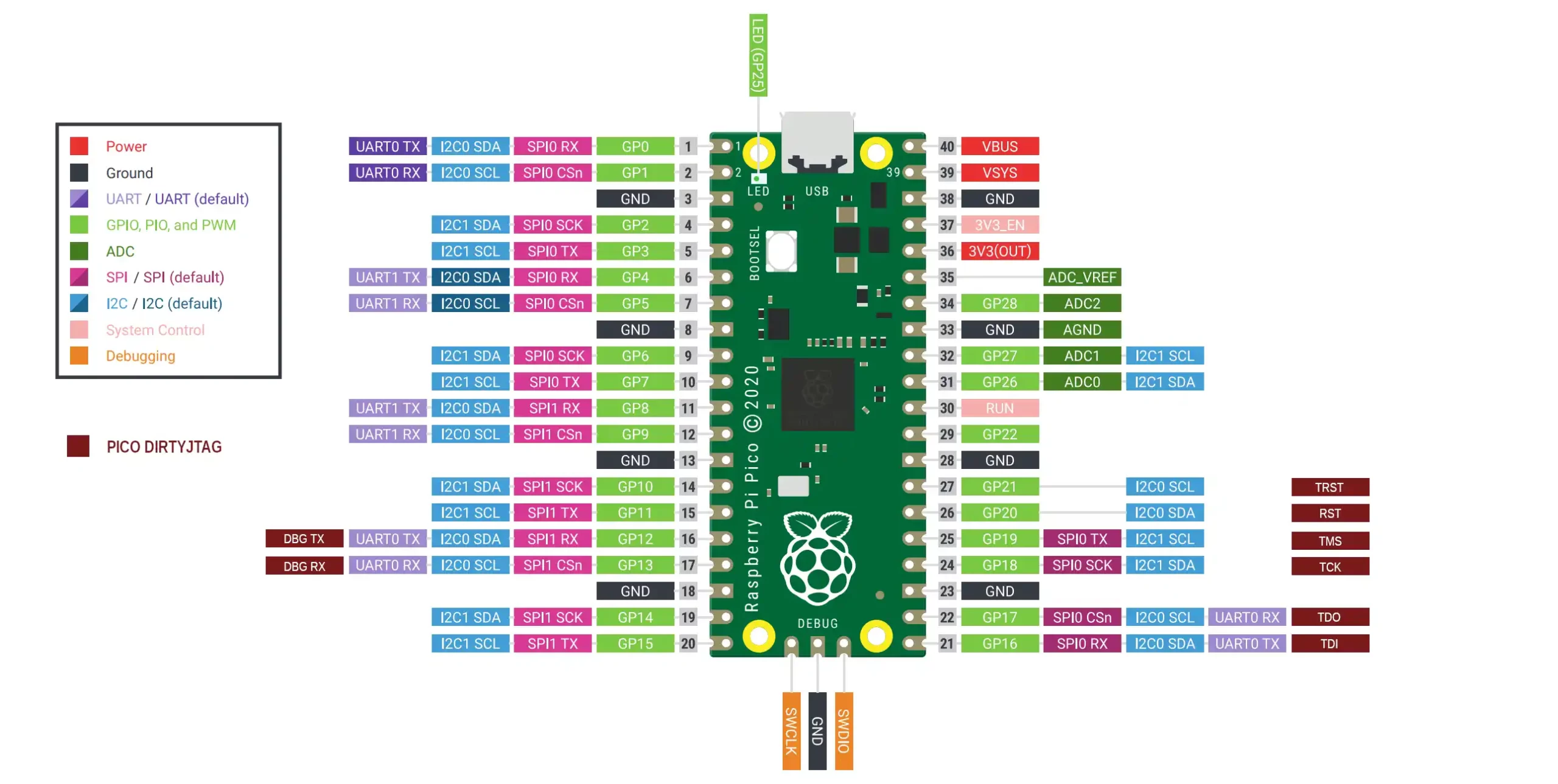
| Pin name | GPIO | Pico Pin Number |
|---|---|---|
| TDI | GPIO16 | 21 |
| TDO | GPIO17 | 22 |
| TCK | GPIO18 | 24 |
| TMS | GPIO19 | 25 |
| RST | GPIO20 | 26 |
| TRST | GPIO21 | 27 |
| DBG TX | GPIO12 | 16 |
| DBG RX | GPIO13 | 17 |
Other configurations can be achieved by changing the macro definitions in the dirtyJtagConfig.h configurations header file.
#define PIN_TDI 16
#define PIN_TDO 17
#define PIN_TCK 18
#define PIN_TMS 19
#define PIN_RST 20
#define PIN_TRST 21

#define LED_INVERTED   0
#define PIN_LED_TX     25
#define PIN_LED_ERROR  25
#define PIN_LED_RX     25

#define CDC_UART_INTF_COUNT 2
#define PIN_UART0 uart0
#define PIN_UART0_TX    12
#define PIN_UART0_RX    13
#define PIN_UART1 uart1
#define PIN_UART1_TX    4
#define PIN_UART1_RX    5
After configuring and building the Pico-DirtyJTAG project, we’ll just need to flash the firmware to the Pi Pico board using UF2, and we’re good to go.
Why Would I Use OpenFPGALoader + DirtyJTAG?
Personally, I’ve been using FTDI solutions to add JTAG support for my custom FPGA hardware designs over the years. Despite knowing that open-source solutions like OpenFPGALoader and DirtyJTAG existed.
Recently, I decided to give it a go and see how it performs. Below are my reasons for pursuing this design decision, and why would anyone consider it as well.
Cost Optimization
Typically, in my custom FPGA-based hardware design projects, when JTAG programmability is needed, I just use the FTDI chip (FT2232H). Which is pretty much the most robust standard solution. But its biggest drawback is the cost it adds to the total BOM of the project. It can be justified in many cases and has less weight in the total BOM.
However, in cost-sensitive applications, the FTDI setup would be extremely costly. Consider, for example, the board shown below.
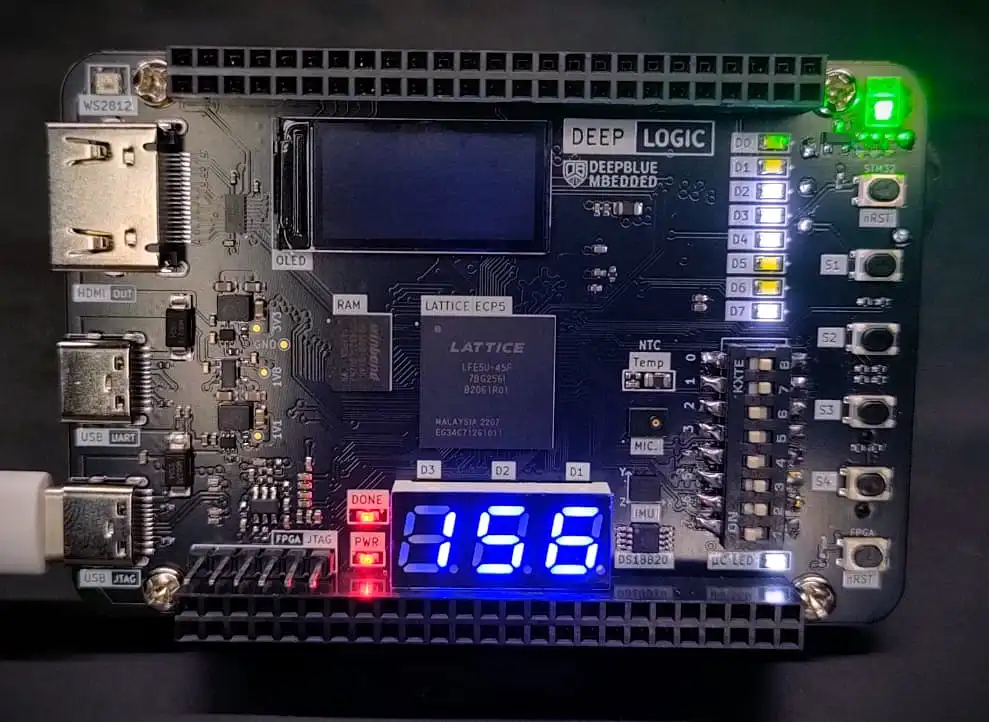
It’s a Lattice ECP5 FPGA board with an FTDI JTAG device that’s used for programming, and also a USB-UART bridge. The core FPGA chip here is a 24,000 logic element device that cost me 5$ while the FTDI chip here was around 9$ alone without its supporting circuitry!
Don’t get me wrong here, the FTDI chip is expensive for a reason! That thing has a high-speed USB PHY, dual serial/parallel ports, SPI, I2C, UART, and so many features that make up for the price tag it comes at. Even the drivers for that chip make it so easy to be picked up by official vendor toolchains (Xilinx Vivado, Lattice Diamond, etc). If we’re not going to use all of its features in a low-cost design, then it’s probably overkill for our target application.
However, using DirtyJTAG, a low-cost 1$ MCU can be used to replace the FTDI chip and still have USB-JTAG programmability as well as USB-UART bridge for debugging on the same USB port, and also be able to use the exact same circuit to program so many FPGA devices in the same way. Ultimately, I’ll add this low-cost solution to my future FPGA-based hardware designs when needed.
Universal FPGA Support
Besides low cost, the ability to program any FPGA device on the long list of compatible devices with the (OpenFPGALoader + DirtyJTAG) combo is quite remarkable. It’s another strong reason that pushed me to give it a try and add it to my custom FPGA board designs.
Open-Source FPGA Toolchains
If you are using open-source FPGA toolchains (Yosys, nextpnr, etc). Then, this is the way to go! You are already in no need of the official FPGA vendor tools and hardware. Just go for the OpenFPGALoader + DirtyJTAG or something, and you’ll be doing fine.
Installing OpenFPGALoader + Pico DirtyJTAG (Windows)
Now, let’s install the tools we’ll need to achieve our goals of this tutorial and get started!
Below is the exact step-by-step installation process of the OpenFPGALoader + Pico-DirtyJTAG tools. And how to use this combo to actually load a bitstream file to an FPGA and also write it permanently on an external configuration SPI FLASH memory chip.
Installation Steps
Step #1
Open the firmware project’s folder with VS Code IDE (Manual installation guide or Extension installation guide)
You can configure the IO pins if needed, or leave them as default options in the dirtyJtagConfig.h configurations header file.
Build the project and flash the UF2 binary file to the Pi Pico board
Step #2
Install MSYS2 (on Windows)
MSYS2 is a collection of tools and libraries that provide an easy-to-use (Linux-like) environment, a package manager, and dev tools for building, installing, and running native Windows software.
Step #3
Open MSYS2 and run the command below to install the OpenFPGALoader utility.
pacman -S mingw-w64-ucrt-x86_64-openFPGALoader
This will automatically fetch and install all the required software packages and dependencies for the OpenFPGALoader utility.
Step #4
From the Start menu, find the MSYS2 UCRT64 executable and open it. The MSYS2 UCRT64 should’ve been installed from the previous steps.
After opening that terminal, run the following command to check the version number of OpenFPGALoader just to make sure it’s been installed successfully.
openFPGALoader -V
It should print out the version number with no problems. Otherwise, you’ve not successfully installed the OpenFPGALoader utility.
Step #5
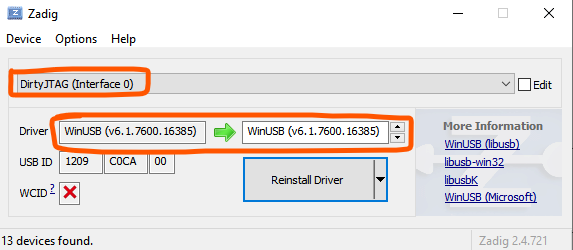
Install and Open the Zadig Tool
Connect the Pi Pico to your PC’s USB port
And replace the default Windows USB driver with “WinUSB“
Step #6
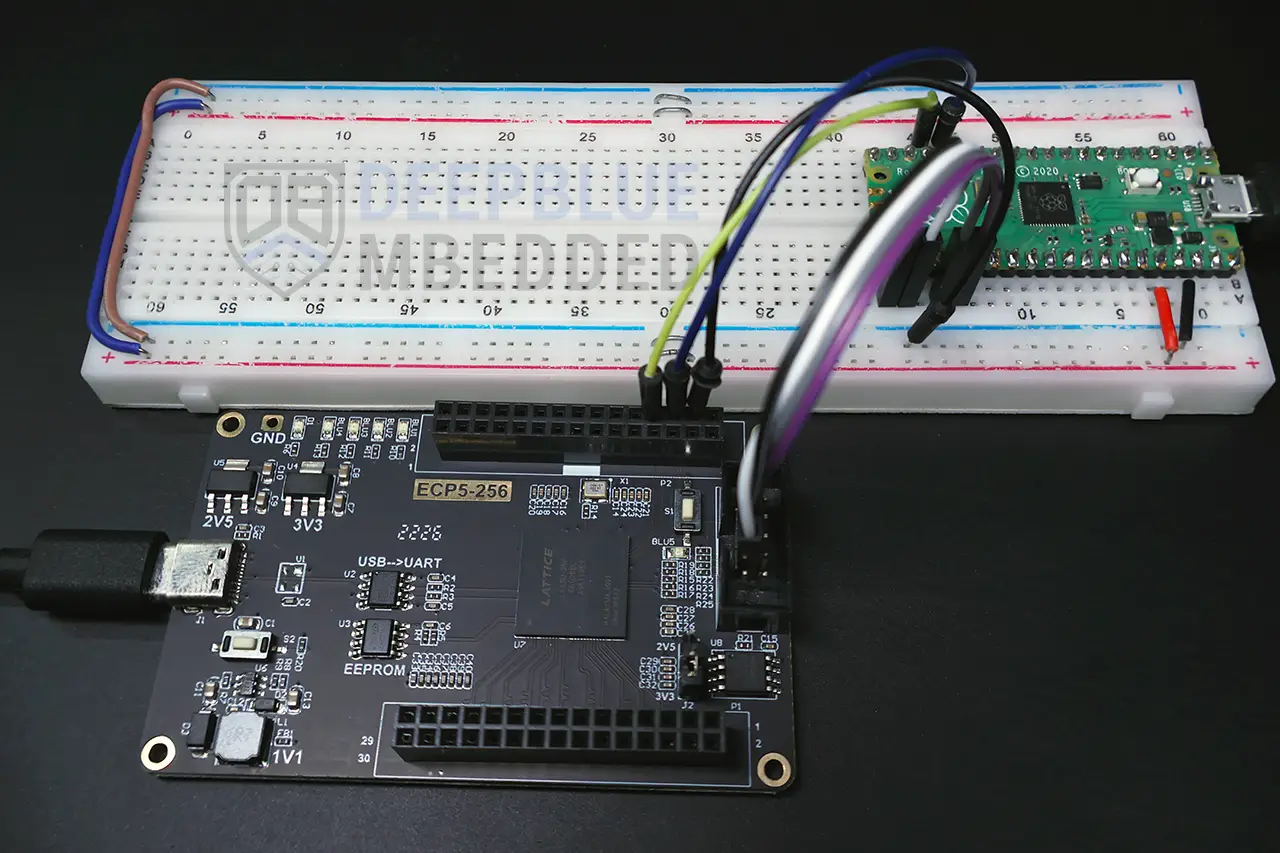
Connect the Pico JTAG pins to the FPGA JTAG pins and power up both boards. You can use any of the supported FPGA devices, not necessarily the one I’m showing below; it’s just for your own reference and for me to demonstrate the tool usage!
Step #7
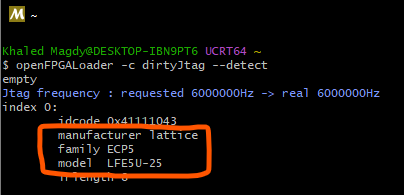
In MSYS2 UCRT64, run the command below to detect the target FPGA chip that’s connected to our Pico-DirtyJTAG cable.
openFPGALoader -c dirtyJtag --detect
If everything is working fine, you should see something like the message below. This indicates that the Pico-DirtyJTAG cable is working fine and the target FPGA device is being successfully detected! Yup, it’s the ECP5 LFE5U-25 chip.
Bitstream Loading
To load a bitstream file on your FPGA device, you’ll need to follow the steps below:
Step #8
In MSYS2 UCRT64, change the directory to point to the path where your bitstream file is located. For example:
cd "path/to/bitstream"
Step #9
Write Bitstream -> FPGA’s SRAM
openFPGALoader -c dirtyJtag --bitstream My_Bitstream_File.bit
Step #10
Flash Bitstream -> FPGA’s External SPI Flash
openFPGALoader -c dirtyJtag -f My_Bitstream_File.bit --write-flash
And that’s all about it! Now, let’s get to the fun part and create a couple of demo projects to test this tool.
Placing PCBA Order @ JLCPCB
When we’re ready, we’ll have to generate the fabrication files and send them to JLCPCB for PCB fabrication and assembly.
1. Upload Your Gerber File & Check PCB Fab. Options
The next step is to upload your PCB Gerber files and modify the PCB fabrication options as needed in your project. Just keep an eye on the price because some options are not allowed in the standard fabrication process, which will end up costing you a bit more and take a bit more time to get fabricated.
Even if you’re 100% sure that your design & fabrication files are flawless, the online system & JLCPCB or any other fab house can still pick up incorrect components’ orientation or placement. Always double-check the PCB component placement after uploading your files.
2. Upload BOM & CPL Files
The next step is to upload your design’s BOM file and the components positions file (CPL) to JLCPCB and let it check the files and report the stock status and total number of components to be assembled, their cost, and so on.
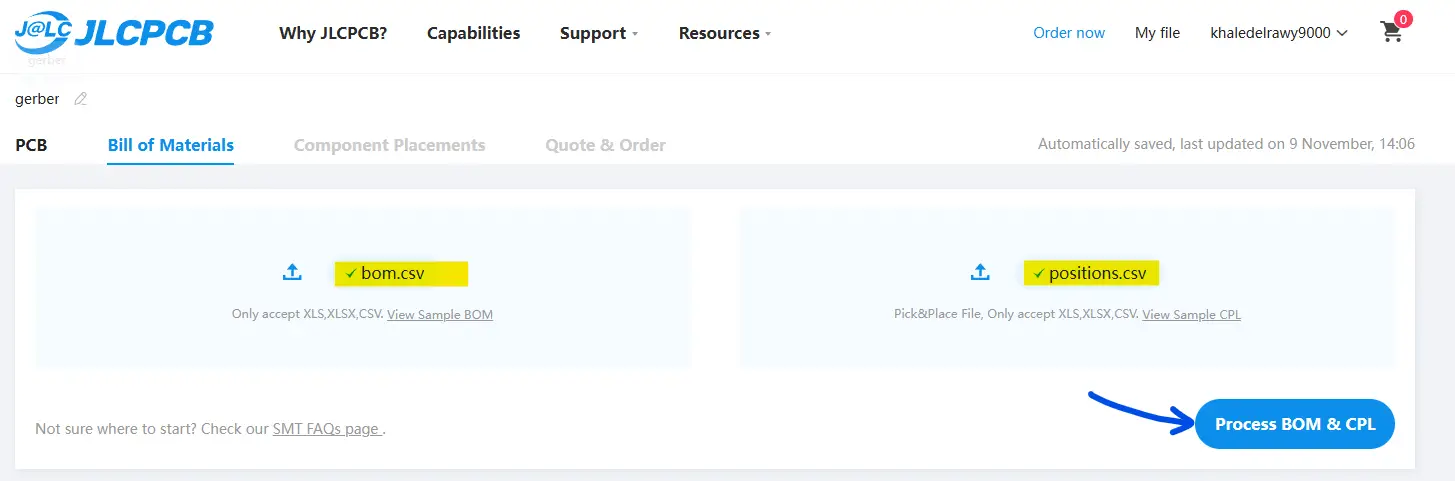
Check everything and make sure the components are selected correctly from the JLCPCB SMT library. And also double-check the component placements on the next page and correct any wrong rotations in the CPL file.
3. Pay To Place Your Order
The last step to place your order is to pay for the invoice, and you can apply any valid discount coupon at this step to reduce the cost.
Using my link here will grant you 60$ worth of discount coupons: https://jlcpcb.com/?from=deepbluembedded
4. Wait For Delivery & Prepare For Testing!
You should expect to receive your board within 4 days to 1 week, depending on where you live.
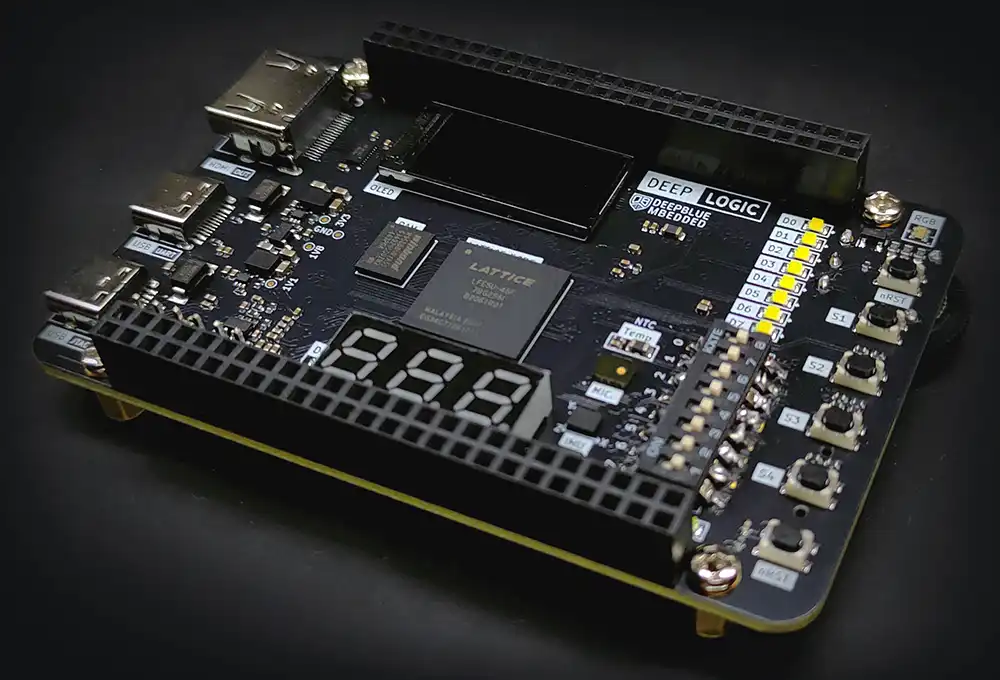
Here is how it turned out at the end.
Lattice ECP5 GPIO Demo (Lattice Diamond)
This is the first test example project in which we’ll connect one of the 4 onboard LEDs attached to the user push button pin. So that the LED is controlled by the push button’s state. It’s the most basic Verilog example we could ever do.
Lattice ECP5 GPIO Example Code
The HDL Code For This Example
/*
 * LAB Name: Lattice ECP5 FPGA GPIO Demo (Verilog)
 * Author: Khaled Magdy
 * For More Info Visit: www.DeepBlueMbedded.com
*/
module top (
    input  wire      btn,
    output wire [3:0] led
);

    assign led = {3'b111, btn};

endmodule
Note that I’m writing 1’s to the other 3x LEDs. Since I want to keep them OFF, only led[0] is controlled by the push button ( btn) signal.
Run the synthesis tool, place-n-route, generate the bitstream file, and load it to the FPGA using OpenFPGALoader + DirtyJTAG as shown earlier in the step-by-step guide.
Lattice ECP5 GPIO Demo Test Result
Here is the test result for this GPIO demo project, and as you can it works as expected. Even after a hard reset for the FPGA, it successfully loads the bitstream file from the external SPI FLASH configuration memory.
Lattice ECP5 UART Demo (Lattice Diamond)
Lattice ECP5 UART Example Code
/*
 * LAB Name: Lattice ECP5 FPGA UART Demo (Verilog)
 * Author: Khaled Magdy
 * For More Info Visit: www.DeepBlueMbedded.com
*/
module top (
	input  wire clk,
	input  wire i_Rx_Serial,
    output wire o_Tx_Serial,
	output wire [3:0] led
);

    assign led = 4'b1111;

	localparam UART_CLKS_PER_BIT = 208; // (24MHz/115200bps)
	wire w_Rx_DV;
	wire [7:0] w_Rx_Byte;
	reg r_Tx_DV = 1'b0;
	reg  [7:0] r_Tx_Byte = 8'h00;
	wire w_Tx_Active;
	wire w_Tx_Done;

	uart_rx #(.CLKS_PER_BIT(UART_CLKS_PER_BIT)) UART_RX_INST
    (
      .i_Clock(clk),
      .i_Rx_Serial(i_Rx_Serial),
      .o_Rx_DV(w_Rx_DV),
      .o_Rx_Byte(w_Rx_Byte)
    );

    uart_tx #(.CLKS_PER_BIT(UART_CLKS_PER_BIT)) UART_TX_INST
    (
      .i_Clock(clk),
      .i_Tx_DV(r_Tx_DV),
      .i_Tx_Byte(r_Tx_Byte),
      .o_Tx_Active(w_Tx_Active),
      .o_Tx_Serial(o_Tx_Serial),
      .o_Tx_Done(w_Tx_Done)
    );

    always @(posedge clk) begin
	  if (w_Rx_DV && !w_Tx_Active) begin
		r_Tx_Byte <= w_Rx_Byte;
		r_Tx_DV   <= 1'b1;
	  end else begin
		r_Tx_DV   <= 1'b0;
	  end
    end

endmodule
Connect the FPGA IO pins (RX, TX) to the Pi Pico UART0 (TX, RX) pins. And use any serial terminal on a PC to verify that the loopback test is working as expected.
Lattice ECP5 UART Test Result

What's The Catch With DirtyJTAG + OpenFPGALoader?
Up till now, it seems like everything is fine and dandy. We're able to connect to an FPGA using the Pi Pico DirtyJTAG firmware, we were able to write bitstream files to an FPGA's SRAM and external configurations SPI FLASH memory. Is there any catch to using the OpenFPGALoader + DirtyJTAG combo? Any sort of limitations or drawbacks that might force us to go back to the traditional route (official vendor tools, FTDI chips, etc)?
It turns out to be some catches about using those open-source tools. Below are two of the most notable things that you should keep in mind when deciding to use those tools.
FPGA Compatibility
If you've looked carefully at the FPGA compatibility list, you might have noticed that it's not a complete list of devices or families that are supported by the OpenFPGALoader tool. Only a few parts of each FPGA device family are actually supported by the utility. Sometimes, the external FLASH memory access is not available as well.
Official Toolchains Support
If you're going to use the official vendor's toolchains like (Xilinx Vivado, Altera Quartus Prime, Lattice Diamond, etc). The built-in programmer tools for these toolchains will not pick up the DirtyJTAG device as a proper programming cable. And you won't be able to use built-in features like scopes, analyzers, and such.
However, I've recently noticed some efforts like this project. Which is basically a bunch of wrapper scripts for the OpenFPGALoader that automatically handle USB device attachment and detachment for FPGA USB programming cables.
So that it can be picked up by the Xilinx Vivado hardware manager as an official programming cable. This unlocks all natively supported features (like the ILA) and paves the way for more toolchains to have a similar kind of wrappers to close the gap between the (vendor's official & open-source) tools even more.
Wrap Up
By the end of this tutorial, you should have learned how to install both OpenFPGALoader & DirtyJTAG utilities. And use them as a replacement for the official vendor JTAG programming cables to write bitstream files to any FPGA device or its onboard configuration SPI FLASH memory chip.
In the future, I'll show you how I've integrated the DirtyJTAG project into a custom FPGA-based hardware PCB design. It'll be an interesting project to look up to. Stay tuned, and make sure you're subscribed to my YouTube Channel so you don't miss any of the upcoming videos.
[YouTube Video] OpenFPGALoader + DirtyJTAG Tutorial
coming soon...
